
Table of Contents
If you use Obsidian as your personal knowledge base and Claude as your AI assistant, you are almost certainly paying more than you should — and getting slower results than you could.
Most people set up Obsidian for their own brain: atomic notes, bidirectional links, beautiful graph views. That system works well for human navigation. But Claude doesn’t think the way you do. It reads your vault top-down, converts every filename, folder path, and word into tokens, and pays for all of it before doing a single useful thing.
An unoptimised 1,000-file vault can burn 50,000–150,000 tokens on overhead alone — every single session. That’s money spent before Claude has written a word, summarised a document, or helped you make a decision.
If you’re new to Obsidian, our guide to Obsidian as a thinking tool and the Building a Second Brain framework are the best places to start. If you already use Obsidian and want to make it work harder with Claude — or if you’re running Claude Cowork or AI agents that tap into your vault — this post is for you.
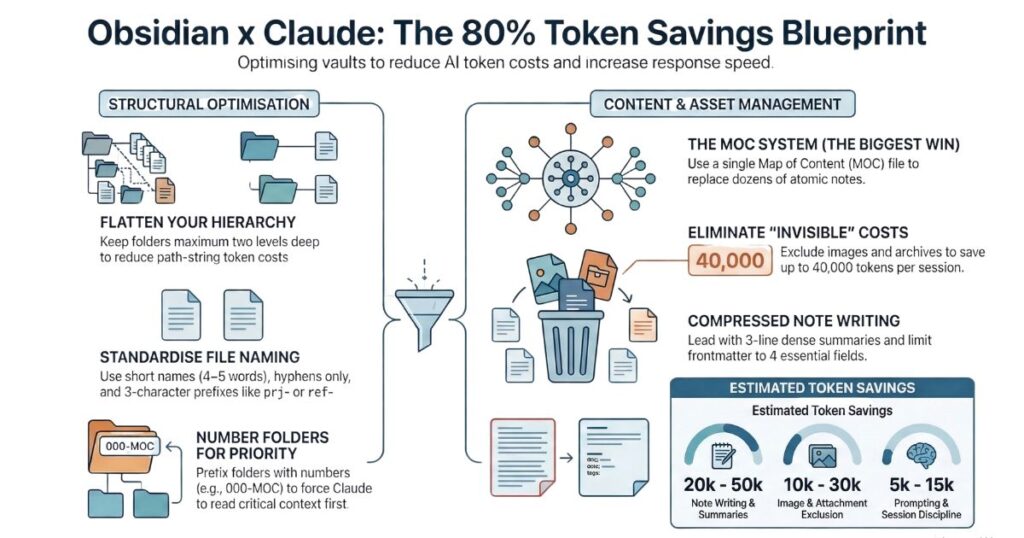
Here are 33 rules that reduce your token overhead by up to 80%.
What Are Tokens — And Why Do They Cost You Money?
Before the rules: a quick explanation of what’s actually happening.
Every time Claude reads something — a filename, a folder path, a sentence in a note — it converts that text into tokens. Roughly speaking, one token equals about three-quarters of a word. A full sentence might cost 20 tokens. A long filename might cost 15. A bloated frontmatter block might cost 80. Multiply that across 1,000 files and you start to see the problem.
Tokens matter for three reasons:
- Cost — API and Cowork usage is billed per token
- Speed — more tokens means slower responses
- Context limits — Claude has a fixed context window per session; the more it fills with overhead, the less room there is for actual work
For a deeper primer on how Claude processes language, see What Are Large Language Models?
The good news: most token waste is structural. Fix the structure, and the savings are automatic — every session, forever.
Section 1 — File Naming (Rules 1–5)
Every filename is read by Claude as part of a path string. Five rules make a significant difference across a large vault.
Rule 1 — Keep names short: 4 to 5 words maximum
The filename identifies the note. The content explains it. You do not need the full topic compressed into the name.
✅
moc-ai-tools.md
❌moc-artificial-intelligence-tools-and-platforms-overview.md
Rule 2 — Use short prefixes to identify file type
A 3–4 character prefix tells Claude what kind of file it is without opening it. This alone saves Claude from loading files it doesn’t need.
| Prefix | Type |
|---|---|
moc- | Map of Content |
prj- | Project |
ref- | Reference |
tpl- | Template |
arc- | Archive |
✅
prj-website-rebrand.md
❌website-rebrand-project-notes.md
Rule 3 — Hyphens only — no underscores, no spaces
Hyphens tokenise cleanly. Underscores add friction. Spaces break file paths entirely.
✅
moc-ai-tools.md
❌moc_ai_tools.md/moc ai tools.md
Rule 4 — Use an underscore prefix for priority files
A leading _ forces a file to the top of any alphabetical listing. Claude reads top-down, so your most important files get read first — before Claude has consumed tokens on lower-priority content.
✅
_index.mdalways appears first
❌index.mdgets buried alphabetically
Rule 5 — Keep dates in frontmatter, not in filenames
Dates in filenames are tokenised every time Claude reads that file — including when it’s just scanning a folder. Store dates in frontmatter instead. They cost nothing to load and are just as useful.
✅
ref-ai-tools.mdwithcreated: 2026-03-21in frontmatter
❌ref-ai-tools-2026-03-21.md
Exception: session logs or journals where the date is the identifier. 2026-03-21-session.md is fine — the date is the content.
Section 2 — Folder Structure (Rules 6–11)
Folder structure determines how Claude navigates your vault. A well-designed structure means Claude reaches the right context with the fewest possible reads.
Rule 6 — Maximum 2 folder levels deep
Every folder in a path adds tokens to every file beneath it. A file nested 4 levels deep pays that cost on every single read.
✅
/200-clients/lhg/pp-brief.md
❌/clients/lhg/food/brands/pizza/pp-brief.md
Rule 7 — Number folders for predictable ordering
Numbered prefixes force folders into a logical sequence regardless of alphabetical order. Claude encounters your most important folders first — every time.
✅
000-moc/,100-admin/,200-clients/,300-references/
❌admin/,clients/,moc/,references/
Rule 8 — Put Claude’s entry point folder first
Your Maps of Content folder should sit at 000 so it appears at the very top of every directory listing. It is the first thing Claude sees — and the cheapest way to give it full context on any topic.
Rule 9 — Use short, lowercase folder names
Folder names appear in every file path beneath them. A long folder name adds tokens across every single file it contains.
✅
/200-clients/
❌/Active Client Notes & Projects 2026/
Rule 10 — Organise by note type, not by topic
This is the rule most Obsidian users get wrong. Topic-based folders (e.g. /ai-tools/, /marketing/, /restaurant-clients/) fragment your knowledge and force Claude to load multiple folders to get full context on a single subject.
Use MOC files for topic organisation. Use folders only to separate note types. This principle is at the heart of both the Building a Second Brain framework and the PARA Method.
✅
/300-references/ai-tools.md+/000-moc/moc-ai-tools.md
❌/ai-tools/chatgpt.md,/ai-tools/claude.md,/ai-tools/gemini.md
Rule 11 — Archive rather than delete
Move inactive notes to /500-archive/. Explicitly tell Claude never to load that folder. Your knowledge is preserved; Claude never has to look at it.
✅
500-archive/old-project-notes.md
❌ Deleting notes that might have future value
Section 3 — Note Writing (Rules 12–19)
This is the highest-impact section. Every word inside a note costs tokens. Well-written notes deliver high value at low cost. Poorly written notes force Claude to read through noise to find signal.
Rule 12 — Lead with a dense summary
Put the most important information in the first 3–5 lines. Claude reads top-down — if the key insight is buried halfway down the page, Claude has consumed the full file before reaching it.
✅ “ChatGPT: best for beginners. Weakness — hallucinates local data. Best use: menu copy, customer reply templates.”
❌ “In this note I want to share some thoughts I have developed over time about ChatGPT and what I’ve observed in my work…”
Rule 13 — Keep frontmatter lean: 3 to 4 fields maximum
Frontmatter is read on every file load. Remove any field Claude cannot use to complete a task. title, type, tags, and last_updated cover almost every use case.
✅
title: ChatGPT for Small Business
type: reference
tags: [ai-tools]
last_updated: 2026-03-21
❌ Adding
aliases,mood,word-count,reviewed,source,priority— all pure overhead
Rule 14 — Write in compressed prose — no padding
Every filler phrase costs tokens. “Based on my research and personal experience, I have come to the conclusion that…” costs 18 tokens. “Make.com preferred over Zapier —” costs 8. The meaning is the same. The cost is not.
Rule 15 — Never restate the title inside the note body
The filename and the H1 heading are already tokenised. Repeating them in the opening paragraph doubles the cost for zero additional information.
✅ Body opens immediately with the key insight
❌ “This note covers everything I know about ChatGPT. ChatGPT is a tool made by OpenAI that…”
Rule 16 — Limit wiki links to what Claude needs
Every [[wiki-link]] is a potential extra file fetch. Only link to notes Claude would genuinely need to read to complete a task. Decorative or associative links waste tokens.
✅ Link upwards to MOC files and downwards to: active projects, key reference notes
❌ Link to: every tangentially related idea, passing mentions, date references
Rule 17 — Use bullet points over prose for list-like content
When content is naturally list-like, bullets are more token-efficient than sentences. Claude parses structured lists faster.
✅
Best use cases:
- Menu description generation
- Customer reply templates
- Social media captions
❌ “There are several key use cases including generating menu descriptions, writing customer reply templates, and creating social media captions…”
Rule 18 — Remove content Claude will never use
Audit your notes for content that serves your personal thinking but adds no task value for Claude. Common token waste:
- Raw URLs with no context:
https://www.youtube.com/watch?v=xxxxx - Half-finished thoughts: “Maybe worth exploring this more someday…”
- Lengthy blockquotes copied from external articles
- Questions you have already answered
Replace all of the above with one clean sentence summarising the conclusion.
Rule 19 — Split notes by use — not just by idea
In Zettelkasten, you split notes by concept. For Claude efficiency, also split by who reads it. Personal reflections, emotional context, and exploratory thinking cost tokens but rarely help Claude complete a task.
✅
chatgpt-use-cases.md— Claude reads this
✅chatgpt-personal-journey.md— you read this
❌ Both in one note
Section 4 — Prompting and Sessions (Rules 20–24)
How you prompt Claude is as important as how you structure your vault. Vague prompting forces Claude to load broadly and respond at length — both of which burn tokens. These rules become even more critical when running AI agents and automated workflows, where every inefficiency compounds across hundreds of runs.
Rule 20 — Scope every request explicitly
Tell Claude exactly which files to read before starting any task. Unscoped requests force Claude to load broadly and guess what context is needed.
✅ “Read only
_index.mdandmoc-ai-tools.md, then write a workshop intro for restaurant owners.”
❌ “Look at my vault and help me write a workshop intro.”
Rule 21 — Avoid vague instructions
Vague instructions produce long exploratory responses. Specific instructions produce targeted, cheaper outputs.
✅ “Summarise
moc-consulting.mdin 5 bullet points.”
❌ “Tell me about my consulting work.”
Rule 22 — Control output length
Claude’s responses cost tokens too. When you don’t need a long answer, say so explicitly.
✅ “Give me 3 bullet points only.” / “One paragraph maximum.” / “Be concise — no preamble.”
❌ Leaving output length open when a short answer is sufficient
Rule 23 — Don’t repeat context mid-conversation
Once Claude has read a file in a session, it holds it in context for the duration of that conversation. Don’t paste the same content again in a follow-up message — you are paying for it twice.
✅ Turn 1: “Read
moc-ai-tools.mdand summarise it.” Turn 2: “Now write a blog intro based on that summary.”
❌ Turn 2: [pastes full file content again] “Now write a blog intro.”
Rule 24 — Start a new session for unrelated topics
Every previous message in a session is re-sent with each new prompt. After 10–15 turns on one topic, start a fresh session for a different task rather than continuing the same thread.
✅ Session 1: workshop content. Session 2: Instagram content (new session).
❌ Workshop → Instagram → blog post → email draft → all in one long thread
Section 5 — Your Index and CLAUDE.md (Rules 25–27)
Your _index.md and CLAUDE.md files are loaded at the start of every session. Because they are read repeatedly, every unnecessary word in them is paid over and over again.
Rule 25 — Keep your _index.md lean
Every sentence in your index is tokenised every single session. Write it as a tight briefing — not a detailed document. Think of it as a one-page brief, not a handbook.
✅ “AI Tools MOC: see
moc-ai-tools.md— covers ChatGPT, Claude, Gemini, Canva AI, Make, Zapier.”
❌ “The AI Tools section of my vault contains all of my notes relating to artificial intelligence tools that I use in my consulting practice. This includes notes on ChatGPT which is made by OpenAI…”
Rule 26 — Exclude folders explicitly
Tell Claude which folders to ignore. Without explicit exclusions, Claude may attempt to load archive files, attachments, and personal notes it will never need.
Add a line like this to your CLAUDE.md or _index.md:
“Never load files from
/500-archive/or/600-attachments/unless I explicitly ask.”
Rule 27 — Separate behavioural instructions from your index
Detailed instructions about how Claude should behave — tone, format, output style — belong in a dedicated _claude-instructions.md file, not embedded in your index. This way you only load instructions when needed, not on every task.
✅
_index.md(vault map only — short and cheap) +_claude-instructions.md(detailed rules — load when needed)
❌_index.mdwith 500 words of behavioural instructions loaded every single session
Section 6 — Images, Tags, and Vault Hygiene (Rules 28–33)
Rule 28 — Use images sparingly — they are extremely expensive
A single image costs 1,000–2,000 tokens depending on its dimensions. That is more tokens than an entire well-written MOC file. If Claude is scanning a folder that contains images, it pays that cost even for images completely unrelated to the task.
Use images only when visual content is the actual deliverable.
Rule 29 — Isolate all attachments in one dedicated folder
Create a single /600-attachments/ folder for all images, PDFs, and media files. Exclude it explicitly from Claude’s scope. Never let media files sit inside folders Claude scans regularly.
Rule 30 — Use text descriptions instead of images where possible
A short text description of an image costs almost nothing compared to the image itself, and Claude can use it just as effectively for most tasks.
✅ “Logo: bold red wordmark on white background, flame icon above the first letter.” → ~15 tokens
❌ [embedded logo image] → ~1,500 tokens
Rule 31 — Cap tags at 3 to 5 per note
Every tag is a token cost. A note with 12 tags wastes 20–40 tokens on metadata that Claude rarely uses for task completion. Three to five broad tags are sufficient for any note.
✅
tags: [ai-tools, consulting, workshop]
❌tags: [chatgpt, gpt4, openai, llm, ai, chatbot, ai-writing, tools, productivity, consulting, small-business, training]
Rule 32 — Use broad, consistent tags throughout
Broad tags group content efficiently. Granular tags fragment it and multiply token costs without adding value. Pick one convention — kebab-case — and apply it everywhere.
✅
ai-toolsthroughout
❌ai-toolsANDAIToolsANDAI_toolsANDartificialintelligencetools— all meaning the same thing, all costing separate tokens
Rule 33 — Audit your vault quarterly
Token costs compound silently. A 30–60 minute quarterly pass keeps your vault lean and your Claude sessions efficient.
Quarterly checklist:
- Merge any new stub notes (3 lines or less) into their parent MOC
- Update
_index.mdwith current priorities - Move completed projects to
/500-archive/ - Remove truly dead notes — duplicate drafts, abandoned ideas with no content
- Check frontmatter fields across active notes — remove unused ones
- Verify
/500-archive/and/600-attachments/are excluded in your index
The MOC System: The Single Biggest Win
If you apply only one idea from this post, make it this one.
The biggest token drain in any Obsidian vault is not long filenames or bloated frontmatter. It is the Zettelkasten problem: a topic that lives across 20–30 small atomic notes, each one requiring a separate file load, each one requiring Claude to follow links to build a complete picture.
The solution is a Map of Content — a single file that synthesises everything Claude needs to know about a topic, written as a briefing rather than a collection of linked fragments.
| Scenario | Without MOCs | With MOCs |
|---|---|---|
| Claude researches “AI Tools” topic | Loads 47 atomic files (~94,000 tokens) | Loads 1 MOC file (~2,000 tokens) |
| Claude writes a blog post | Traverses 8–12 linked notes | Reads 1 MOC and writes |
| Automated task runs weekly | Re-reads scattered notes each run | Reads index + 1–2 MOCs |
| Estimated saving | Baseline | 80–95% fewer tokens on context loading |
How to implement it:
- Create a
000-moc/folder at the top of your vault - Create one MOC file per major topic area —
moc-ai-tools.md,moc-clients.md,moc-consulting.md - Write each MOC as a dense briefing: what you know, what you’ve decided, what’s still open
- When starting any Claude task: “Read
_index.mdfirst, then load only the MOC files relevant to this task.”
Your atomic notes stay intact. Claude reads the MOC. You get 80–95% fewer tokens on context loading — every session.
What the Savings Look Like
Across a 1,000-file vault, following all 33 rules produces estimated savings of:
| Area | Estimated Saving Per Session |
|---|---|
| File naming | 5,000–8,000 tokens |
| Folder structure | 2,000–4,000 tokens |
| Note writing | 20,000–50,000 tokens |
| Prompting discipline | 5,000–15,000 tokens |
| Lean index and CLAUDE.md | 1,000–3,000 tokens |
| Images and attachments excluded | 10,000–30,000 tokens |
| Tag trimming | 1,000–2,000 tokens |
| Vault hygiene | 5,000–10,000 tokens |
| Total | ~50,000–120,000 tokens per session |
That is a 60–80% reduction in token overhead. Faster responses. Lower costs. And a much larger share of Claude’s context window available for actual work — rather than reading folder paths.
Where to Start
If this feels like a lot, start with the three highest-impact changes:
- Create a
000-moc/folder and write one MOC for your most-used topic. One file. 200–400 words. Done. - Audit your frontmatter. Open 10 notes and remove every field Claude cannot use to complete a task.
- Add folder exclusions to your index. One line: “Never load
/500-archive/unless asked.”
Those three changes alone will cut your token overhead significantly — before you touch a single filename.
Want to take this further? If you’re building AI-powered workflows for your business — automated agents that work through your knowledge base, make decisions, and take action — Twinlabs Research helps businesses build and implement AI decision intelligence systems. An optimised vault is the foundation; AI agents are what you build on top of it.