Table of Contents
Learning Objectives
By the end of this lesson, you will be able to:
- Define what custom slash commands are in Claude Code and why they exist
- Explain where slash commands are stored and how to create one
- Identify appropriate use cases for custom commands in a development workflow
- Describe how parameterised commands extend slash command functionality
What Slash Commands Are
Slash commands are reusable prompts or workflows triggered by typing /commandname in the Claude Code interface. Instead of typing out a long, detailed instruction every time you want Claude to perform a specific task, you invoke a command and Claude executes the full workflow defined behind it.
This matters for two reasons. First, it eliminates repetition — instructions you use regularly do not need to be retyped or copy-pasted each session. Second, it enforces consistency — every invocation of a command runs the same instruction set, which means the output follows the same structure and covers the same ground every time. In a team context, consistency across developers becomes a meaningful quality control mechanism.
Built-In vs Custom Commands
Claude Code ships with a set of built-in slash commands. /help surfaces available commands and usage guidance. /clear resets the current conversation context. Additional built-in commands handle common operational tasks within a session.
Custom commands extend this system with project-specific or team-specific workflows. Where built-in commands handle general Claude Code operations, custom commands encode the particular workflows that matter to your project — your code review checklist, your pre-deployment verification steps, your documentation generation process. The built-in commands are fixed; custom commands are entirely under your control.
Where Custom Commands Are Stored
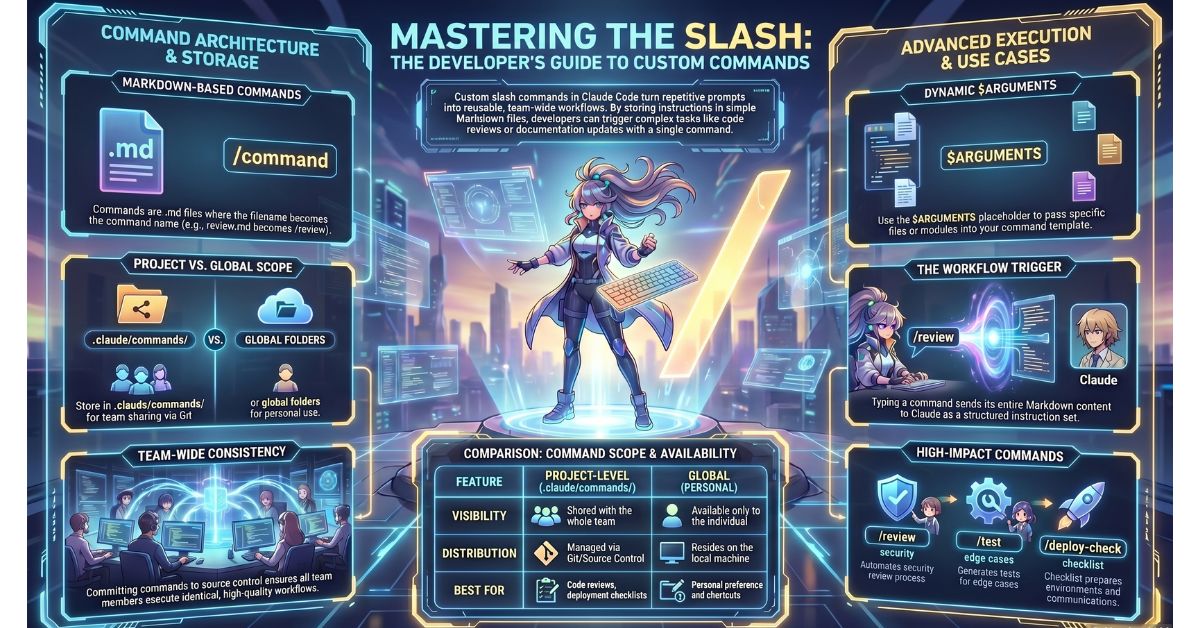
Custom slash commands are stored as markdown files with the .md extension. The filename, without the extension, becomes the command name. A file named review.md creates the /review command.
Two storage locations determine the scope of a command:
Project-level commands are stored in .claude/commands/ within the project root. These commands are available to anyone working in that project with Claude Code. When the .claude/commands/ directory is committed to source control, the commands travel with the repository and require no individual setup from team members.
Personal (global) commands are stored in the equivalent commands/ directory within the user’s global Claude Code configuration folder. These commands are available across all projects on that machine but are not shared with other team members. They are the right location for commands that reflect individual workflow preferences rather than shared team processes.
The distinction mirrors the global vs project-level CLAUDE.md separation covered in Lesson 2.3: personal preferences go in the global location, shared team workflows go in the project location and into source control.
How to Create a Slash Command
Creating a custom command requires one step: create a .md file in the appropriate commands/ directory and write the instruction set that Claude should execute when the command is invoked. The file’s content is the complete prompt Claude receives.
The following is a worked example of a /review command file stored at .claude/commands/review.md:
Perform a structured code review on the file or code provided.

Cover the following areas in order:

1. **Correctness** — identify any logic errors, off-by-one issues, or incorrect assumptions
2. **Security** — flag any input validation gaps, exposure of sensitive data, or unsafe operations
3. **Performance** — note any inefficient patterns, unnecessary database calls, or blocking operations
4. **Readability** — assess naming clarity, function length, and comment quality
5. **Test coverage** — identify untested edge cases or missing assertions

Format your response as a numbered list under each heading. If a section has no issues, state "No issues found" rather than omitting the heading.
When a developer types /review in Claude Code, Claude receives this full instruction set and applies it to the current context or to any input provided alongside the command.
Parameterised Commands
Commands become significantly more flexible with the $ARGUMENTS placeholder. When a developer invokes a command with additional text after the command name, Claude Code substitutes that text for every instance of $ARGUMENTS in the command file.
A /review command without parameters applies to whatever context is currently active in the session. A parameterised version allows the developer to specify a target directly at invocation:
Perform a structured code review on $ARGUMENTS.

Cover the following areas in order:
...
Invoking /review src/api/auth.js passes src/api/auth.js as the argument. Claude reads the instruction as “Perform a structured code review on src/api/auth.js” and targets that file specifically.
This pattern allows a single command template to handle variable inputs without requiring separate command files for each target. The same /review command works for any file path, module name, or other variable input the developer provides at invocation. $ARGUMENTS can appear multiple times in a command file and will be replaced consistently throughout.
Practical Use Cases
The following command types represent common, high-value applications of custom slash commands in a development workflow:
- /review — triggers a structured code review covering correctness, security, performance, readability, and test coverage
- /test — runs through a testing checklist for a given function or module: unit test coverage, edge cases, mock usage, and assertion quality
- /deploy-check — executes a pre-deployment safety review: environment variable completeness, migration status, feature flag states, and rollback readiness
- /document — generates structured documentation for a function or module, including parameters, return values, side effects, and usage examples in the format the project uses
Each of these encodes a workflow that would otherwise require a developer to either retype a detailed prompt or accept an inconsistent, ad hoc result. The command enforces the workflow every time.
Team Usage and Source Control
Committing the .claude/commands/ directory to source control is the mechanism by which custom commands become a team asset rather than an individual convenience. Once committed, every team member who clones the repository and opens it in Claude Code has access to the full set of project commands without any manual setup.
This has practical implications for onboarding and process enforcement. A new team member who joins the project gets the code review workflow, the pre-deployment checklist, and the documentation generator on day one, without needing to be trained on how to write the prompts. The commands are part of the project, in the same way that linting configuration and test setup are part of the project.
Teams should apply the same review discipline to changes in .claude/commands/ as they apply to changes in any other shared configuration. A pull request that modifies a command file changes the behaviour of a workflow used by the entire team.
Key Takeaways
- Custom slash commands are markdown files stored in
.claude/commands/at the project or global level; the filename becomes the command name and the file content is the complete instruction set Claude executes on invocation - Project-level commands stored in
.claude/commands/and committed to source control are available to every team member without individual setup; global commands apply only to the individual developer’s machine - The
$ARGUMENTSplaceholder allows a single command file to accept variable input at invocation, making command templates reusable across different targets without duplication - Slash commands enforce consistency — every invocation of a command runs the same instruction set, which standardises output quality and reduces dependence on individual prompt-writing skill
What Is Tested
Exam questions on custom slash commands ask candidates to identify the correct file location for a command given a described scenario — for example, whether a command used by an entire team belongs in the project .claude/commands/ directory or the global configuration directory, and what the implications of each choice are. Questions also test understanding of $ARGUMENTS: given a command file template and an invocation string, candidates must identify what Claude receives as its instruction. Scenario-based questions may present a command stored in the wrong location and ask candidates to diagnose why it is not available in the described context.