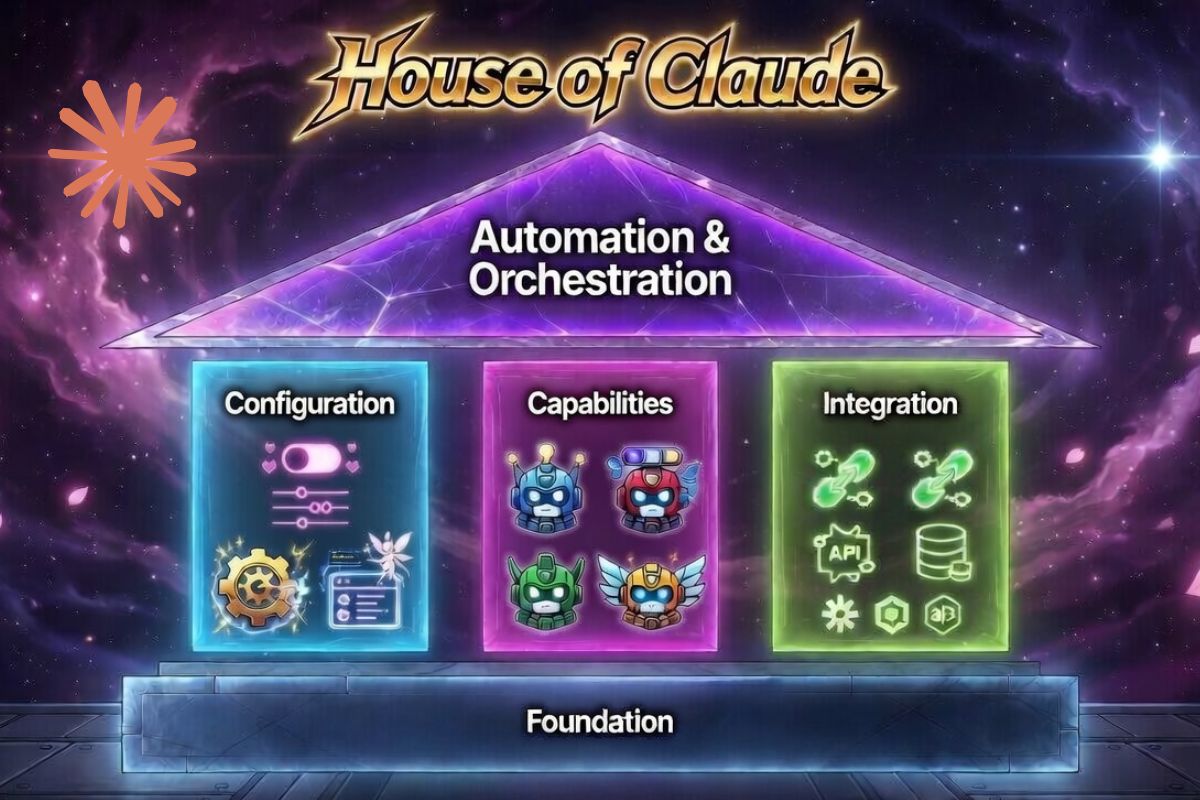
This is your main page and you will be able to navigate the enire course from this page. After each lesson, you will return to this page by clicking the INDEX button at the bottom of each page
MODULE 1: FOUNDATION
Getting started with setup and basic access.
This first module is designed for complete beginners. It walks you through installing Claude Code and setting up everything you need so you can open the tool and start using it confidently without getting stuck on technical hurdles.
1.1 Installation & CLI Setup: How to install and configure the Claude Code CLI.
1.2 Authentication & Model Selection: Setting up authentication and choosing the right Claude model.
MODULE 2: CONFIGURATION
How Claude behaves — the “personality & rules” layer.
Before Claude can help you effectively, you need to tell it how you want it to work. This module teaches you how to set the rules, memory, permissions, and safety settings so Claude behaves exactly the way you (and your team) expect every single time.
2.1 CLAUDE.md Files: Creating and using the central CLAUDE.md file to define workspace behavior and instructions.
2.2 Context Window Management: Effectively managing and optimizing the context window.
2.3 Memory Management: Working with persistent memory, rules, and project knowledge.
2.4 Session History & Conversation Management: Managing session history and long-running conversations.
2.5 Permissions & Trust Model: Controlling what Claude is allowed to do (permissions and trust settings).
2.6 Safety, Guardrails & Settings: Configuring safety rules, guardrails, and other key settings.
2.7 Cost & Token Management: Monitoring and managing token usage and costs.
MODULE 3: CORE CAPABILITIES
What Claude can do — the core “doing” layer.
Now that Claude is properly set up and configured, this module shows you all the powerful everyday tools it has. You will learn how to make Claude actually do things in your project — reading files, editing code, running commands, and more.
3.1 Prompt Engineering – How Claude Thinks: Understand Claude’s reasoning process & mastering effective prompting.
3.2 File Tools: Read, Write & Edit: Using Claude’s built-in tools to read, write, and edit files in your workspace.
3.3 Bash & Shell Execution: Running shell commands and scripts directly through Claude.
3.4 Built-in Slash Commands: Using Claude’s pre-built slash commands for quick actions.
3.5 Custom Slash Commands: Creating your own on-demand slash commands for repeatable tasks.
3.6 Plugins & Skills: Building and using reusable Skills (automatic workflows) and Plugins for sharing.
MODULE 4: INTEGRATION & WORKFLOWS
How Claude connects to tools, systems, and daily workflows.
Claude becomes truly powerful when it works inside the tools you already use every day. This module teaches you how to connect Claude to your IDE, Git, the web, external apps, and more so it becomes a seamless part of your normal workflow.
4.1 IDE Integrations: Integrating Claude with popular IDEs and development environments.
4.2 Git Workflows: Using Claude with Git for version control and daily development workflows.
4.3 WebSearch & WebFetch: Enabling and using web search and webpage fetching capabilities.
4.4 MCP Servers & Connectors: Connecting Claude to external tools via MCP (Model Context Protocol) servers.
4.5 Hooks: Setting up event-triggered automation (if X happens, automatically do Y).
4.6 API Access & Streaming: Working with Claude’s API, streaming responses, and external integrations.
MODULE 5: ADVANCED AUTOMATION & AGENTS
Building powerful automated systems and agentic workflows.
This final module takes you from “using Claude” to “building with Claude.” You will learn how to create intelligent automated systems, coordinate multiple agents, run Claude in the background, and build professional-grade automations.
5.1 Extended Thinking: Using Claude’s advanced step-by-step reasoning and thinking modes.
5.2 Prompt Caching & Optimisation: Optimizing performance and reducing costs with prompt caching and other techniques.
5.3 Vision, Multimodal & Tool Use: Advanced use of vision, images, multimodal inputs, and sophisticated tool calling.
5.4 Multi-Agent Orchestration: Coordinating multiple sub-agents to work together on complex tasks.
5.5 The Agent SDK: Using the Claude Agent SDK to build custom programmable agents in code.
5.6 Headless & CI Mode: Running Claude in non-interactive, automated, and CI/CD environments.
5.7 GitHub Actions Integration: Automating workflows with GitHub Actions and Claude.