Table of Contents
Learning Objectives
By the end of this lesson, you will be able to:
- Distinguish clearly between global and project-level Claude Code configuration
- Explain how the two configuration layers interact and which takes precedence
- Design a configuration strategy for a team using Claude Code across multiple projects
- Identify common configuration anti-patterns
Recap: The Configuration Layer Model
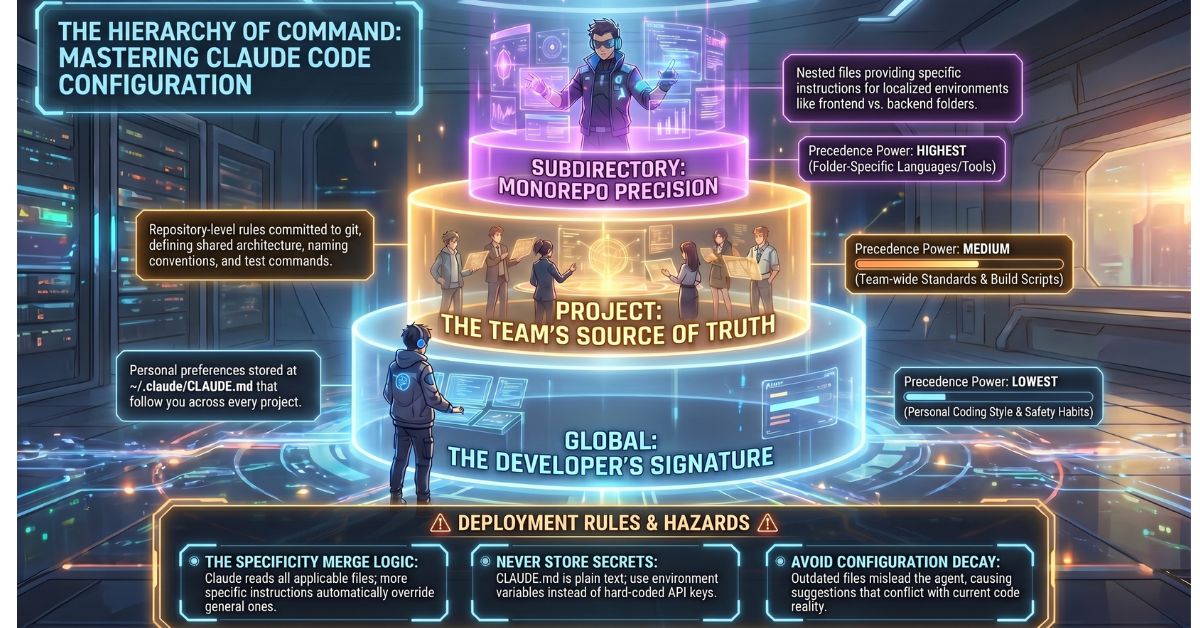
Lesson 2.2 introduced the three-level CLAUDE.md hierarchy: global, project-level, and subdirectory. Each level scopes its instructions to a different context. More specific files take precedence over less specific ones when instructions conflict, and Claude Code merges all applicable files into a single working context at session start.
This lesson examines each layer in practical terms — what belongs at each level, how teams should manage the separation, and what goes wrong when the separation breaks down.
Global Configuration: Personal Preferences That Travel With the Developer
The global CLAUDE.md, stored at ~/.claude/CLAUDE.md, applies to every Claude Code session on that machine regardless of which project is open. It is the right place for instructions that reflect how an individual developer always wants Claude to behave.
Typical global configuration content includes:
- Personal coding style preferences — preferred indentation, comment style, or conventions the developer applies consistently regardless of project
- Default safety rules — instructions like “always ask before deleting any file” or “never run destructive database commands without confirmation” that the developer wants enforced everywhere
- Cross-project tools and shortcuts — references to tools the developer uses on every project, such as a preferred diff viewer or a standard git workflow
The defining characteristic of global configuration is that it reflects the individual, not the project. A developer who prefers verbose variable names or always wants Claude to explain its reasoning before making changes puts those preferences in the global file. Those preferences follow the developer across every codebase they open.
Project-Level Configuration: The Shared Source of Truth
The project-level CLAUDE.md lives at the repository root and is committed to source control. It is the primary configuration file for the project and the one most relevant to team-based work.
Project-level configuration covers everything Claude needs to understand and work effectively within a specific codebase:
- Project architecture description — what the system does, how it is structured, and where the key components live
- Team coding conventions — naming patterns, module boundaries, preferred libraries, and patterns that are explicitly rejected
- Off-limits files and directories — explicit rules about which parts of the codebase Claude must not modify without confirmation
- Test and build commands — the exact commands Claude uses to verify its own changes
- Project-specific safety rules — constraints that apply to this codebase specifically, such as never modifying auto-generated files or always creating a feature branch before making changes
Because this file is committed to source control, every team member who opens the project in Claude Code operates under the same instructions. The project-level CLAUDE.md is the mechanism by which a team standardises Claude’s behaviour across all sessions and all contributors.
Subdirectory Configuration: Precision Within a Monorepo
In a monorepo, different parts of the codebase often have genuinely incompatible conventions. A /frontend directory built with React and TypeScript and a /backend directory built with Python and FastAPI require different instructions about naming conventions, testing frameworks, linting rules, and build commands.
Placing all of this in the project-level CLAUDE.md produces a bloated, conflicting instruction set. Subdirectory CLAUDE.md files solve this cleanly. Each subdirectory carries its own instructions that apply only when Claude is working within that folder. The frontend instructions do not interfere with backend work, and both coexist with the project-level file, which can still carry instructions that apply to the repository as a whole.
This pattern scales well. Teams with three or more distinct service boundaries in a monorepo benefit significantly from subdirectory-level configuration.
How Claude Code Merges Configurations
At session start, Claude Code locates all applicable CLAUDE.md files — global, project-level, and any relevant subdirectory files — and merges them into a single working context. Claude does not choose one file over another; it reads all of them.
Where instructions conflict, the most specific file wins. A project-level instruction overrides a global instruction. A subdirectory instruction overrides a project-level instruction for files within that directory. This precedence model is consistent and predictable, which means architects can design configuration hierarchies with confidence that specificity always resolves conflicts.
Team Workflow Implications
The separation between global and project-level configuration has a direct consequence for team workflows. A developer’s personal preferences — the ones stored in their global CLAUDE.md — stay on their machine. They do not enter the repository, and they do not affect any other team member’s Claude Code sessions.
The project-level CLAUDE.md is the shared contract. When a team agrees on a convention, that convention goes into the project file, gets committed, and applies to everyone. This creates a consistent baseline across all sessions without requiring individual developers to manually synchronise their personal configurations.
Teams should treat the project-level CLAUDE.md with the same care as any other shared configuration file. Changes to it should go through a normal pull request review process, particularly when those changes alter rules that govern Claude’s behaviour on sensitive parts of the codebase.
Configuration Anti-Patterns
Putting everything in the global file. A global CLAUDE.md loaded with project-specific instructions means Claude receives irrelevant context every time it opens any project. A rule about a specific database schema or a convention unique to one codebase has no place in a file that applies everywhere. This degrades response quality across all projects.
Never updating the project CLAUDE.md. A CLAUDE.md that describes the architecture from six months ago actively misleads the agent. Claude makes suggestions and decisions based on what the file says. Stale configuration produces suggestions inconsistent with the current codebase and erodes the value of the configuration system entirely.
Putting secrets in CLAUDE.md. This is a critical security error. CLAUDE.md is a plain text file committed to source control. Any credential, API key, password, or token placed in it is immediately accessible to everyone with repository access, and potentially to anyone who can access the repository’s history. Environment variables handle secrets. CLAUDE.md references variable names, not values.
Key Takeaways
- Global CLAUDE.md holds personal developer preferences that apply across all projects; project-level CLAUDE.md holds team conventions committed to source control and shared across all contributors
- Claude Code merges all applicable CLAUDE.md files at session start; when instructions conflict, the most specific file takes precedence
- Subdirectory CLAUDE.md files are the correct solution for monorepos where different parts of the codebase have incompatible conventions
- The three primary anti-patterns are overloading the global file with project-specific instructions, allowing the project CLAUDE.md to go stale, and placing secrets in any CLAUDE.md file
What Is Tested
Exam questions on this topic present a scenario — typically a developer working across multiple projects with different conventions, or a team encountering conflicting instructions across configuration levels — and ask candidates to identify the correct configuration layer for a given instruction, or to determine which CLAUDE.md file takes precedence in a described conflict. Candidates should be able to trace the merge-and-precedence logic precisely: given a global file, a project-level file, and a subdirectory file with overlapping instructions, the exam expects candidates to identify the active instruction at each scope without ambiguity. Anti-pattern identification questions also appear, asking candidates to diagnose a described configuration setup and name the specific error it introduces.