Table of Contents
Learning Objectives
By the end of this lesson, you will be able to:
- Define hooks in Claude Code and explain what problem they solve
- Distinguish between pre-tool and post-tool hooks by purpose and timing
- Identify appropriate use cases for each hook type
- Explain the security considerations that apply to hook design
What Hooks Are
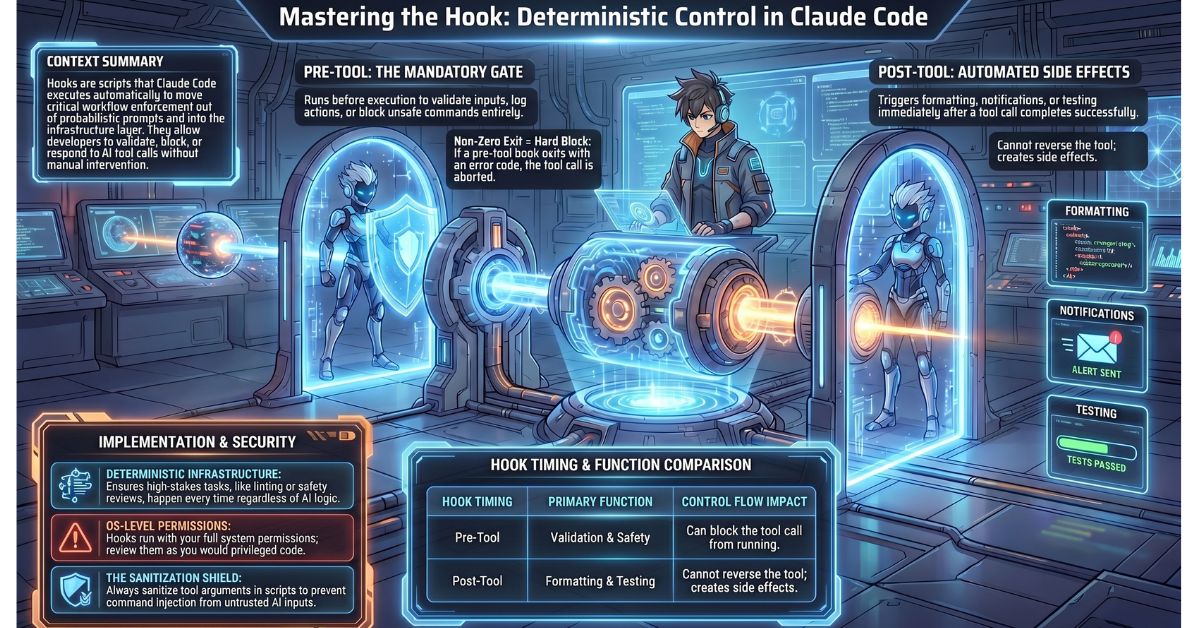
Hooks are scripts or commands that Claude Code executes automatically before or after specific tool calls. They extend Claude Code’s behaviour without modifying the core tool itself and without requiring the developer to re-prompt Claude.
The problem hooks solve is determinism. Claude is a language model — its behaviour is probabilistic, and certain workflow steps are too important to leave to the model’s discretion. You do not want Claude to decide whether to run a linter after editing a file; you want the linter to run every time, automatically, regardless of how the conversation went. Hooks move that enforcement out of the prompt and into the infrastructure layer.
Hooks attach to specific tool names. When Claude Code is about to call a tool, it checks whether any hook is registered for that tool and executes it at the appropriate point in the cycle. The developer defines which tools trigger which hooks and what those hooks do.
Pre-Tool Hooks
A pre-tool hook runs before Claude calls a specified tool. At this point, the intended tool call has been prepared but not yet executed. The hook receives the tool name and the arguments Claude intends to pass, and it can do one of three things: allow the call to proceed, block it by exiting with a non-zero code, or modify the parameters before the tool executes.
Validation is a straightforward pre-tool use case. Before Claude attempts to read a file, a pre-tool hook can confirm the file exists and is accessible. If the check fails, the hook blocks the call and returns a useful error rather than allowing Claude to proceed into a failed tool result.
Safety checks represent a higher-stakes application. Before a destructive operation — deleting a file, writing to a production API endpoint, dropping a database record — a pre-tool hook can pause execution and prompt for explicit human confirmation. This gives the developer a mandatory review gate that cannot be bypassed through the conversation. The hook enforces the pause regardless of what Claude was instructed to do.
Logging is a lower-stakes but operationally useful application. A pre-tool hook that records the tool name, arguments, and timestamp before every tool call produces an audit trail of everything Claude did during a session, in the order it happened, before the actions took effect.
Post-Tool Hooks
A post-tool hook runs after a tool call completes and Claude has received the result. The hook receives the tool name, the arguments that were passed, and the result that was returned. It executes after the fact and cannot reverse the tool call, but it can act on what was produced.
Formatting is the most common post-tool use case. After Claude edits a source file, a post-tool hook can immediately run the project’s linter or formatter on that file. The developer does not need to remember to run formatting manually, and Claude does not need to be instructed to do it — the hook ensures it happens every time a file is touched.
Notifications allow external systems to respond to Claude’s activity. A post-tool hook can post a message to a Slack webhook when Claude completes a significant operation, send a log entry to a monitoring system, or trigger a downstream process. This is particularly useful in team environments where other members need visibility into what an automated Claude Code session has done.
Automated testing is a high-value post-tool application. After Claude modifies a source file, a post-tool hook can immediately run the test suite against the affected module. If tests fail, that result enters Claude’s context on the next interaction, giving Claude the feedback it needs to correct its changes without the developer having to manually run tests and report the output.
How Hooks Are Configured
Hooks are specified in Claude Code’s settings file, where each entry links a tool name to a script path and designates whether the hook fires before or after the tool call. The configuration identifies the tool by name — for example, write_file or bash — and points to the script Claude Code should execute at the specified point in the cycle.
The hook script receives its inputs via standard input or environment variables depending on the hook type: the tool name, the arguments passed to the tool, and, for post-tool hooks, the result the tool returned. The script can be a shell script, a Python script, or any executable the environment can run.
Hook Outputs and Control Flow
A pre-tool hook that exits with a non-zero status code blocks the tool call. Claude Code interprets a non-zero exit as an instruction to abort the intended tool invocation. The hook’s standard output or error output is surfaced as the reason for the block. A pre-tool hook that exits with zero allows the call to proceed normally.
A post-tool hook’s output is logged but does not alter Claude’s active context unless the hook directly modifies the tool result or writes to a file that Claude subsequently reads. Post-tool hooks are side-effect mechanisms, not feedback mechanisms. If you need the output of a post-tool hook to influence Claude’s next action, the hook must produce that output in a form Claude can observe — typically by writing it to a file and ensuring Claude reads it.
Security Considerations
Hooks run in the developer’s environment with the same operating system permissions as the Claude Code process. A hook script has access to the file system, the network, and any credentials available to the current user. This is what makes hooks powerful and what makes poorly designed hooks dangerous.
A post-edit hook that constructs a shell command using unsanitised tool arguments — for example, passing a filename directly into a shell string without escaping — creates a command injection surface. If Claude passes an unexpected value as a file path argument and the hook interpolates it directly into a shell command, the result can be arbitrary code execution with the developer’s permissions.
Hook scripts should treat all inputs as untrusted. Validate and sanitise tool arguments before using them in shell commands. Restrict hook scripts to the narrowest set of permissions they need to function. Review hook scripts with the same scrutiny you would apply to any code that runs with elevated access in your environment.
Example: Post-Tool Lint Hook for JavaScript Files
The following example shows a post-tool hook that runs npm run lint automatically after Claude edits any .js file.
Hook configuration entry (in Claude Code settings):
{
  "tool": "write_file",
  "timing": "post",
  "script": ".claude/hooks/post-edit-lint.sh"
}
Hook script at .claude/hooks/post-edit-lint.sh:
#!/bin/bash

FILE_PATH="$1"

if [[ "$FILE_PATH" == *.js ]]; then
  echo "Running lint on $FILE_PATH"
  npm run lint -- "$FILE_PATH"
  exit $?
fi

exit 0
When Claude calls write_file to edit a .js file, Claude Code executes this script with the file path as the first argument. If the file has a .js extension, the script runs the project linter against it. If linting fails, the non-zero exit code is logged. If the file is not a .js file, the script exits cleanly without doing anything.
Key Takeaways
- Hooks are scripts that Claude Code executes automatically before or after specific tool calls, enforcing deterministic behaviour at the infrastructure level without relying on prompts or Claude’s discretion
- Pre-tool hooks run before a tool executes and can validate, block, or log the intended call; a non-zero exit code from a pre-tool hook aborts the tool call entirely
- Post-tool hooks run after a tool completes and are used for formatting, notifications, and automated testing; they do not alter Claude’s context unless they produce output that Claude subsequently reads
- Hook scripts run with the same OS-level permissions as the Claude Code process — inputs must be sanitised and scripts must be reviewed carefully to avoid command injection and unintended side effects
What Is Tested
Exam questions on hooks present a workflow requirement and ask candidates to determine the correct hook type, what the hook receives as input, and what security risk applies. A typical question describes a requirement such as “automatically format files after Claude edits them” and asks whether a pre-tool or post-tool hook is appropriate and what the hook script receives. Candidates must also demonstrate understanding of control flow: knowing that a pre-tool hook with a non-zero exit blocks the tool call, while a post-tool hook cannot reverse an action that has already occurred. Security questions ask candidates to identify the specific risk introduced by a described hook implementation — typically unsanitised input used in a shell command — and to explain why hooks warrant the same security review as any other privileged script in the environment.