Table of Contents
Learning Objectives
By the end of this lesson, you will be able to:
- Explain how Claude Code operates in headless (non-interactive) mode
- Identify appropriate and inappropriate use cases for Claude Code in CI/CD pipelines
- Describe the authentication requirements for pipeline use of Claude Code
- Apply cost and reliability considerations to Claude Code pipeline design
Claude Code Beyond the Interactive Terminal
Most developers first encounter Claude Code as an interactive tool — a terminal session where they type instructions, Claude responds, and a back-and-forth conversation drives the work forward. That interactive model is not the only way Claude Code operates.
Claude Code can run as an automated, non-interactive step inside a CI/CD pipeline. In this context, no developer is present. Claude receives a prompt, executes the task against the repository, produces output or modifies files, and exits. The pipeline continues or fails based on the result. This positions Claude Code not just as a developer productivity tool but as an automatable workflow component that integrates with the same infrastructure that runs your tests, builds your artefacts, and deploys your services.
Headless Mode
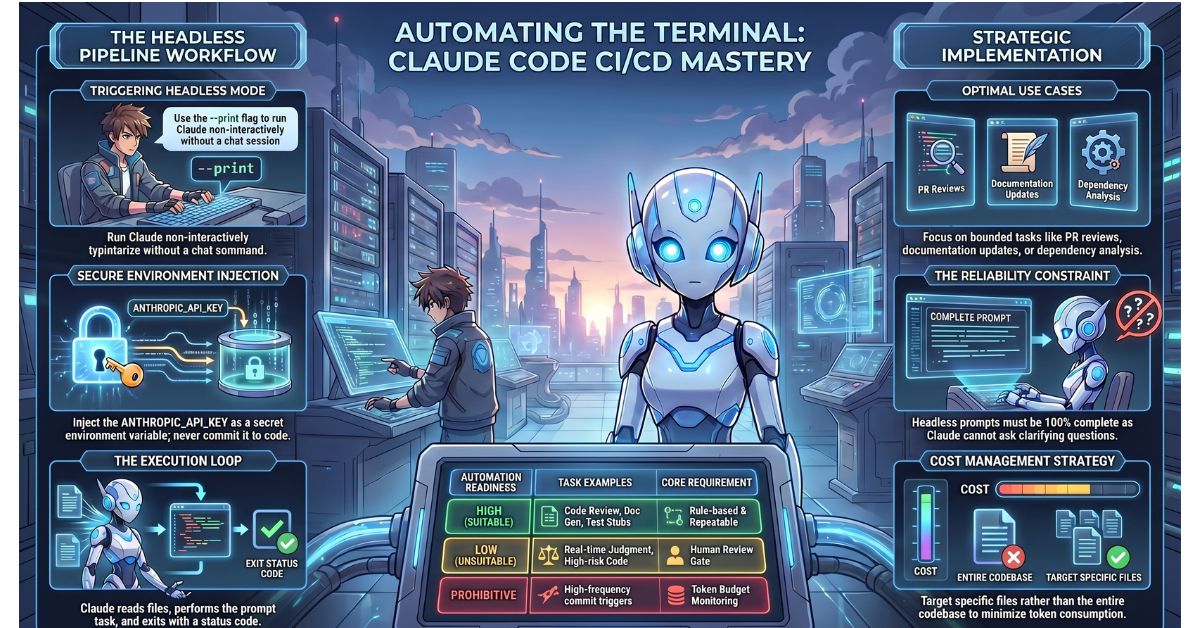
Claude Code’s headless mode is invoked by passing a fully specified prompt via a command-line flag rather than opening an interactive session. Claude executes the task described in the prompt, writes its output, and exits with a status code that the pipeline can interrogate.
In headless mode, Claude does not ask clarifying questions. There is no mechanism for back-and-forth. The prompt is the complete instruction set, and Claude works from it alone. This is the fundamental constraint that distinguishes pipeline usage from interactive usage, and it shapes every design decision covered in this lesson.
A simplified headless invocation looks like this:
claude --print "Review the changes in the last commit for security issues.
Output a JSON array of findings with keys: file, line, severity, description.
If no issues are found, output an empty array."
The --print flag instructs Claude Code to run non-interactively, print its output to stdout, and exit. The pipeline captures that output and processes it like any other command result.
How It Works in a Pipeline
A CI/CD pipeline step that uses Claude Code follows a straightforward sequence. The pipeline invokes Claude Code with a fully specified task prompt. Claude reads the relevant files from the checked-out repository, performs the task — generating a test, reviewing a pull request, updating documentation, analysing dependencies — and writes its output to stdout or directly to a file. The pipeline then reads that output, checks the exit code, or both, and proceeds accordingly.
This integrates naturally with existing pipeline tooling. The Claude Code step behaves like any other shell command in the pipeline: it succeeds or fails, it produces output, and it can be chained with other steps. Pipeline tools such as GitHub Actions, GitLab CI, and Jenkins do not need special Claude Code support — they execute the command the same way they execute any other script.
Appropriate CI/CD Use Cases
Not every task suits pipeline automation with Claude Code. The following use cases are well-matched to the headless, non-interactive model:
Automated code review commentary on pull requests. Claude Code analyses the diff of a pull request and posts structured commentary via the repository’s API. The task is well-defined, the input is deterministic, and the output — a list of observations — is useful even if imperfect.
Documentation generation triggered on merge to main. After a merge, Claude Code reads modified source files and updates or generates corresponding documentation. The trigger is infrequent, the task is bounded, and the output can be reviewed before it is published.
Dependency analysis and licence compliance checking. Claude Code reads the dependency manifest, identifies licences, and flags any that conflict with the project’s licence policy. This is a repeatable, rule-based task with a clear pass/fail outcome.
Test stub generation for newly added functions. After a commit that introduces new functions, Claude Code generates test stubs for those functions and opens them as a file for developer review. This reduces the friction of starting test coverage without removing the developer from the loop.
Authentication in Pipelines
Claude Code requires an Anthropic API key to operate. In an interactive session, the developer’s locally configured credentials handle authentication transparently. In a CI/CD pipeline, the key must be explicitly provided.
The correct mechanism is an environment variable. The pipeline injects ANTHROPIC_API_KEY as a secret environment variable at runtime, and Claude Code reads it from the environment. Most CI/CD platforms — GitHub Actions, GitLab CI, CircleCI, and others — provide a secrets management interface specifically for this purpose.
The API key must never appear in pipeline configuration files, shell scripts, or anywhere in the repository. A key committed to source control, even briefly, is compromised. Pipeline configuration files are often readable by all repository contributors, and repository history persists even after a key is removed from the current branch. Treat the API key with the same rigour as a database password.
Cost Considerations
Every headless invocation of Claude Code consumes API tokens. Unlike interactive sessions where the developer controls the pace and scope of each interaction, pipeline invocations can accumulate costs at the frequency of your pipeline triggers.
Design pipeline tasks to be targeted. A task that reads only the files changed in the current commit costs far fewer tokens than a task that reads the entire codebase. A per-pull-request trigger costs far less than a per-commit trigger on a high-frequency repository. Prompt design matters too — a concise, well-scoped prompt produces a more focused response at lower cost than a vague prompt that leads Claude to read broadly before it can begin.
Establish a cost baseline for each pipeline task during testing and monitor token usage after deployment. Unexpected cost spikes indicate either a prompt that causes Claude to over-read, or a pipeline trigger that fires more frequently than intended.
The Non-Interactive Constraint
The single most common cause of unreliable pipeline results is an underspecified prompt. In an interactive session, Claude asks for clarification when the task is ambiguous. In headless mode, it cannot. Claude proceeds with whatever interpretation it can make from the prompt alone, which may not be the interpretation the developer intended.
Every headless prompt must be complete and unambiguous. It must specify the input Claude should read, the task it should perform, the format of the output it should produce, and any constraints that apply. A prompt that would require a follow-up question in an interactive session will produce an unreliable result in a pipeline.
Testing headless prompts interactively before deploying them to a pipeline is standard practice. Run the intended prompt in an interactive Claude Code session, observe whether Claude asks any clarifying questions or makes assumptions, and refine the prompt until Claude executes the task correctly from the first instruction alone.
When Not to Use Claude Code in CI/CD
Claude Code is not appropriate for every pipeline step. Avoid pipeline automation with Claude Code in the following situations:
Tasks requiring real-time judgment calls. If the correct action depends on context that cannot be fully captured in a prompt — business logic, organisational policy, stakeholder preference — a human should make the call, not an automated Claude step.
Tasks where an incorrect output is worse than no output. If a wrong result from Claude would cause downstream harm — deploying incorrect code, sending incorrect notifications, modifying production data — the risk profile does not suit automation without a human review gate.
High-frequency pipelines where token cost is prohibitive. A pipeline that runs on every commit to every branch in a large team can generate significant API costs. Evaluate the cost-to-value ratio before deploying Claude Code to high-frequency triggers.
Tasks that require human approval before proceeding. Headless Claude Code cannot pause and wait for a human to review intermediate output before continuing. If the task requires a human in the loop at any point, the pipeline architecture must handle that separately — Claude Code is not the right mechanism for the approval step itself.
Key Takeaways
- Claude Code operates in headless mode via a command-line flag that accepts a fully specified prompt, executes the task non-interactively, and exits with a status code the pipeline can interrogate
- The API key must be injected as a secret environment variable at pipeline runtime and must never appear in configuration files or source control
- Headless prompts must be complete and unambiguous — Claude cannot ask clarifying questions in a pipeline, and an underspecified prompt is the most common cause of unreliable pipeline results
- Pipeline use of Claude Code suits bounded, repeatable tasks with deterministic inputs; it is not appropriate for tasks requiring judgment, human approval, or contexts where an incorrect output causes downstream harm
What Is Tested
Exam questions on CI/CD integration present a pipeline scenario and ask candidates to evaluate whether Claude Code is appropriate for the described step, how the API key should be provided, or what would cause the headless invocation to produce an unreliable result. A typical question describes a pipeline step — for example, generating documentation after a merge, or performing a security review on every commit to every branch — and asks candidates to identify whether the use case is suitable, what authentication approach is correct, or what design flaw in the described setup would cause the step to fail or produce incorrect output. Candidates should be able to articulate both the technical constraints of headless mode and the cost and reliability considerations that determine when pipeline automation with Claude Code is and is not the right architectural choice.