Table of Contents
Learning Objectives
By the end of this lesson, you will be able to:
- Define Claude Code and its purpose as a command-line development tool
- Describe how Claude Code differs from the Claude web interface and the Claude API
- Identify the primary use cases for Claude Code in a software development workflow
- Explain the relationship between Claude Code and the Claude Agent SDK
What Claude Code Is
Claude Code is an agentic coding tool that runs directly in the developer’s terminal. It gives Claude access to the local file system, shell environment, and development toolchain — the same resources a developer uses day to day.
Unlike a chat interface, Claude Code operates at the project level. It reads the full codebase, plans a sequence of actions across multiple files, executes those changes, runs tests, and iterates on failures. The developer sets the objective; Claude Code manages the execution loop. This positions it as an autonomous agent operating within the developer’s existing environment rather than a text-based assistant that responds to individual prompts.
Claude Code requires explicit permission before modifying files or running commands by default. Developers control the degree of autonomy, from approving every action individually to allowing built-in classifiers to distinguish safe actions from risky ones automatically.
How Claude Code Differs from the Web Interface
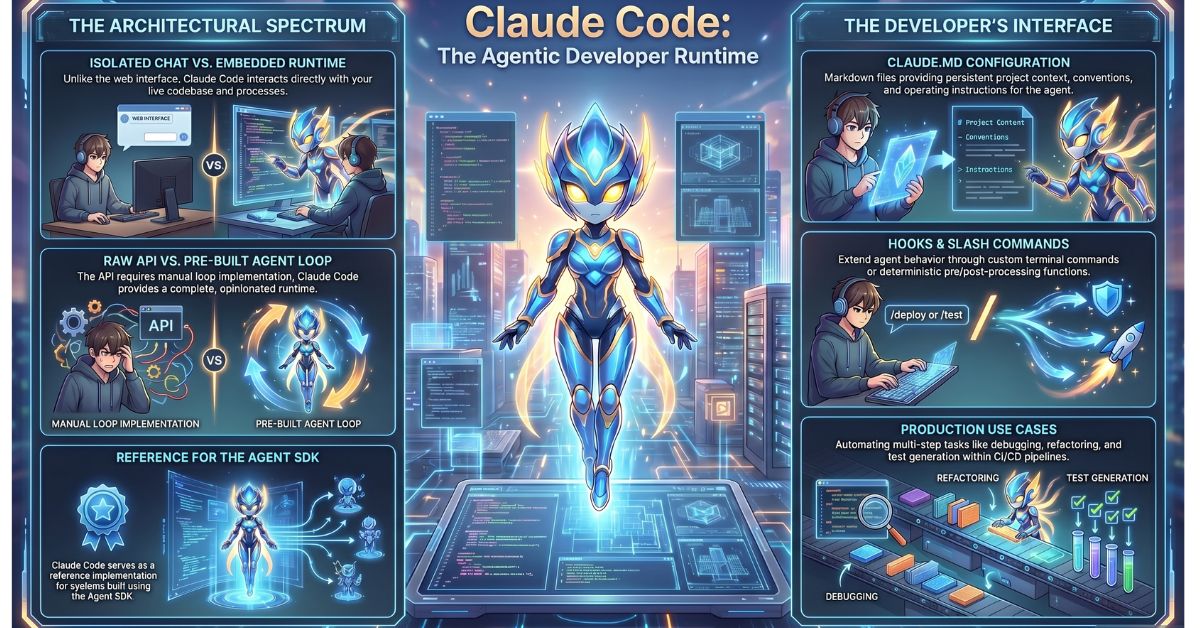
The Claude web interface (claude.ai) is an isolated chat window. Conversations happen in an environment that is separate from your codebase, your file system, and your running processes. Any code you work on must be copied in and copied out manually. The model has no persistent awareness of your project structure between sessions.
Claude Code is embedded directly inside your actual project. It reads real files, runs shell commands, executes your test suite, monitors CI pipelines, and commits code — all within your live development environment. The gap between conversation and action is eliminated. When Claude Code edits a file, that file changes on disk. When it runs a command, it runs in your shell. This is a fundamentally different operational model, not a more convenient version of the chat interface.
How Claude Code Differs from the Raw API
The Anthropic API gives you direct access to Claude’s models. You send a prompt; the model returns a response or a set of tool calls; your code executes those tool calls; you send the results back. You own and implement the entire agent loop. That means you are also responsible for tool execution, context management, error handling, session state, and retry logic. The API is the right choice when you are building a custom integration or a product that requires precise control over every layer of the stack.
Claude Code is a pre-built agentic loop designed specifically for developer workflows. The tool access, context management, configuration, and agent loop are already implemented. You do not write the infrastructure — you configure it and use it. This distinction matters for the exam: the API gives you model access; Claude Code gives you a complete, opinionated agent runtime built on top of that model access.
Primary Use Cases
Claude Code is suited to tasks that involve multiple steps, real files, and the execution of actual commands. Common production use cases include:
- Code review and refactoring — reading existing code across a repository and applying systematic changes
- Debugging — reading error output, tracing through code, applying fixes, and re-running tests iteratively
- Documentation generation — reading function signatures, types, and logic to produce inline or standalone documentation
- Test writing — analysing existing code to generate unit and integration tests and running them to verify coverage
- File operations — creating, moving, reading, and editing files as part of a broader workflow
- Multi-step development tasks — end-to-end task execution such as implementing a feature, running linting, fixing failures, and committing the result
These use cases reflect a pattern: Claude Code is most valuable when a task requires iteration between reading, writing, and executing in a real environment.
The Relationship to the Claude Agent SDK
The Claude Agent SDK (previously the Claude Code SDK, renamed to reflect broader applicability) exposes the same underlying primitives that power Claude Code — the agent loop, built-in tools (Bash, file read/write, search), context management, and filesystem-based configuration — as a programmable Python and TypeScript library.
The significance for architects: Claude Code is a reference implementation of an agentic system. When you understand how Claude Code manages its tool permissions, configuration files, and agent loop, you have a working mental model for building custom agentic systems using the Agent SDK. The SDK gives you the same capabilities — reading files, running commands, executing multi-step workflows — but programmable and embeddable in your own application or pipeline. Teams frequently prototype workflows in Claude Code directly, then productionise those workflows as Agent SDK deployments.
Key Components a Developer Interacts With
Four components form the primary surface area of Claude Code that a developer configures and controls:
- The CLI itself — invoked by running
claudein a terminal from the project directory; accepts natural language instructions and slash commands - CLAUDE.md configuration files — markdown files placed at the project root (and optionally in subdirectories) that provide Claude with persistent context about the codebase, conventions, and operating instructions; these persist across sessions and shape agent behaviour
- Slash commands — structured commands entered at the Claude Code prompt to trigger specific behaviours, such as
/bugfor issue reporting or custom commands defined in the project - Hooks — Python or TypeScript functions that the Claude Code runtime invokes at specific points in the agent loop, enabling deterministic pre- and post-processing of agent actions without modifying the core loop
Each of these components is covered in depth in subsequent lessons within this module.
Why the CCA-F Exam Covers Claude Code
Claude Code is not an optional developer convenience. In production agentic architectures, it functions as a configurable, scriptable agent that can be invoked programmatically, integrated into CI/CD pipelines, and extended through hooks and custom slash commands.
The exam covers Claude Code because architects designing agentic systems need to understand where Claude Code fits relative to the API and the Agent SDK, and how its configuration model — particularly CLAUDE.md and hooks — affects agent behaviour at runtime. A working knowledge of Claude Code also provides direct insight into how the Agent SDK is structured, since the two share the same foundational primitives.
Key Takeaways
- Claude Code is an agentic command-line tool that operates inside a developer’s real project environment, with access to the file system, shell, and development toolchain — not an isolated chat interface
- The primary distinction between Claude Code and the raw Anthropic API is that the API requires you to implement the agent loop yourself, whereas Claude Code provides a complete, pre-built agent runtime with tool access and context management already handled
- The four key components a developer configures in Claude Code are the CLI, CLAUDE.md files, slash commands, and hooks — each controls a different layer of agent behaviour
- Claude Code and the Claude Agent SDK share the same underlying agentic primitives; understanding Claude Code’s architecture is foundational to building custom agentic systems using the SDK
What Is Tested
Exam questions on this topic ask candidates to distinguish between Claude Code, the Anthropic API, and the Claude web interface when given a described use case or deployment scenario. A typical question presents a business requirement — such as automating a multi-step code review process in a CI pipeline, or building a custom integration that requires precise control over tool execution — and asks the candidate to identify which component is the appropriate choice and why. Candidates should be able to articulate not only what each component does, but the architectural implications of choosing one over another in a production context.