Table of Contents
What this lesson is about
This lesson explains what an API is, why it exists, and how it relates to the Claude Code terminal tool you have been using. You will also learn what streaming means — and why it matters for certain types of tasks. By the end, you will know when the CLI is enough and when you might want to go a layer deeper.
The kitchen service window — understanding what an API is
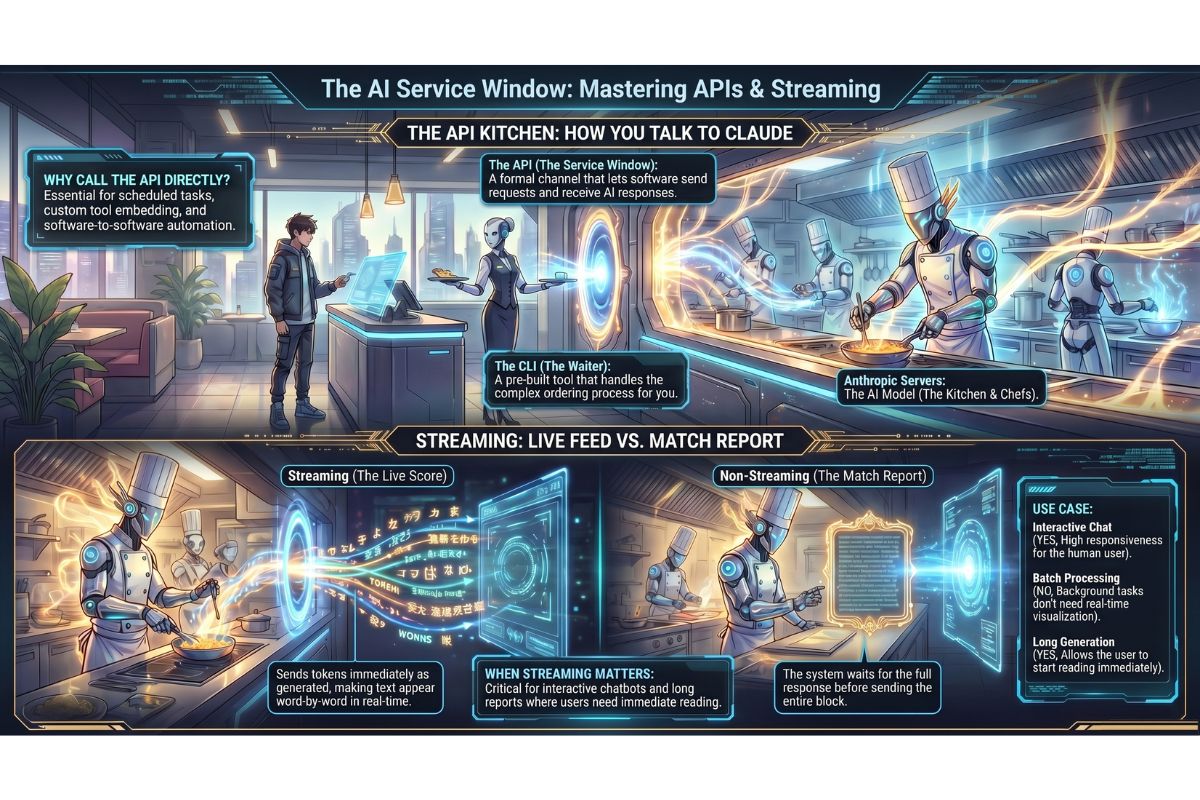
Imagine a busy restaurant. You sit at a table, place your order with a waiter, and your food arrives. You never walk into the kitchen yourself — you do not need to. The kitchen has a service window: orders go in through the window, and completed dishes come back out through it.
That service window is an API — an Application Programming Interface (a set of rules that lets one piece of software talk to another). In Claude’s case, the API is the window between your request and Claude’s response. When you type a message to Claude — whether through claude.ai, a mobile app, or a terminal tool — your message is sent through the API, Claude processes it, and the response comes back through the same window.
You have been using the API all along. You just have not been doing it directly.
The CLI and the API — how they relate
What the CLI actually is
The CLI (Command-Line Interface — the terminal window where you type commands) that you have been using is not Claude itself. It is a ready-made tool that someone — in this case, Anthropic — has already built on top of the API.
Think of it this way:
| Layer | What it is | Analogy |
|---|---|---|
| Anthropic’s servers | The AI model that generates responses | The kitchen and its chefs |
| The API | The formal channel for sending requests and receiving responses | The service window |
| The CLI (Claude Code) | A pre-built tool that uses the API for you | A waiter who handles the ordering process |
| Your terminal | Where you interact with the CLI | Your table in the restaurant |
The CLI handles all the complexity of calling the API — authentication, formatting your request correctly, displaying the response — so that you can simply type and get results. Most of the time, this is exactly what you need.
When the CLI is enough — and when it is not
The CLI is ideal for interactive, on-demand work: asking questions, reviewing documents, generating content, working through a task step by step. It is the right tool for most daily use.
But the CLI has limits. It is designed for a person sitting at a keyboard. It cannot easily:
- Run automatically on a schedule without you being present
- Receive input from another piece of software and pass the result back
- Be embedded inside a custom tool your team uses every day
- Trigger when something else happens — a new row in a spreadsheet, a new email arriving, a form submission
For those situations, you call the API directly. This is how developers build things like AI-powered chatbots, automated document processors, and intelligent reporting tools.
Calling the API directly — a plain-English walkthrough
What a script actually is
A script is a small text file containing a sequence of instructions. When you run it, the computer executes those instructions in order. You do not need to write scripts yourself — Claude can write them for you — but it helps to understand what one looks like.
The script below is written in Python (a popular, readable programming language often used for automation). It sends a message to Claude’s API and prints the response. Read the explanation above each line before reading the code.
Here is what this script does, in plain English:
- It imports (loads) the Anthropic Python library — pre-written code that knows how to talk to the API
- It creates a connection to the API using your account credentials
- It builds a message — just like typing in the terminal, but inside the script
- It sends the message and waits for the response
- It prints the response to the screen
# Line 1: Load the Anthropic library — this gives us the tools to talk to the API
import anthropic

# Line 2: Create a "client" — think of this as opening the service window
client = anthropic.Anthropic()

# Lines 3-10: Build and send the message, then store the response
message = client.messages.create(
    model="claude-opus-4-5",          # Which Claude model to use
    max_tokens=1024,                   # Maximum length of the response (in tokens — roughly word-chunks)
    messages=[
        {"role": "user", "content": "Summarise this in one sentence: APIs allow software to communicate."}
    ]
)

# Line 11: Print Claude's response to the screen
print(message.content[0].text)
That is the entire script. When you run it, Claude receives the message and sends back a response — exactly as if you had typed it into the terminal, but now it is automated.
The key point for non-developers
You do not need to write or memorise any of this code. The important thing is that you understand what the API is and why it exists. When you are ready to build something that uses it, you ask Claude to write the script for you — and Claude will, because writing this kind of code is exactly what it is good at.
What streaming means
The sports score analogy
Imagine two ways to follow a football match:
- Option A: You wait until the final whistle, then someone sends you the full match report.
- Option B: You watch a live score tracker that updates every few minutes — you see the game unfolding in real time.
Streaming is Option B applied to Claude’s responses. Instead of waiting for Claude to finish generating the entire response before sending it to you, streaming sends each word (or small chunk of words) as it is generated. The response appears on your screen word by word, as if someone is typing it in front of you.
This is the default behaviour in claude.ai and the Claude Code terminal. You have already been seeing it — that flowing, progressive appearance of text is streaming in action.
What is actually happening
When Claude generates a response, it produces one token (roughly a word or word-fragment) at a time. Without streaming, the API holds all of those tokens until the response is complete, then sends the whole thing at once. With streaming, each token is sent immediately as it is produced.
| Mode | How it works | What you experience |
|---|---|---|
| Without streaming | Wait for full response, receive it all at once | Nothing, then everything |
| With streaming | Each token sent as it is generated | Text appears progressively |
When streaming matters
Streaming makes a real difference in two situations:
Long responses. If Claude is writing a 2 000-word report, streaming lets you start reading immediately. Without streaming, you would stare at a blank screen for several seconds before anything appeared.
Real-time interfaces. If you are building a chatbot, customer service tool, or any interface where a human is waiting for a reply, streaming feels responsive and alive. The perceived wait time is much shorter even if the total generation time is identical.
When streaming does not matter
If you are running an automated task — a script that processes 50 documents overnight with no human watching — streaming adds no value. The script does not care whether the response arrives word by word or all at once. In these cases, you typically disable streaming to simplify the code.
| Use case | Streaming needed? | Why |
|---|---|---|
| Interactive chat interface | Yes | User is waiting and watching |
| Long document generation | Yes | User can start reading immediately |
| Overnight batch processing | No | No human present; simpler code |
| Short automated lookups | No | Response is brief; no perceptible delay |
Practical Exercise
This exercise does not require you to write any code. The goal is to experience the difference between streaming and non-streaming, and to see how Claude writes API scripts for you.
a. Open a Claude conversation (claude.ai or the Claude Code terminal). Ask Claude the following:
“Write me a simple Python script that calls the Anthropic API without streaming and prints the response. Use the messages.create method. Add a plain-English comment above every line explaining what it does.”
Read each comment carefully. Notice how the structure matches what you learned in this lesson.
b. Now ask Claude to modify the script to use streaming:
“Rewrite that script to use streaming instead. Show me the difference and explain in plain English what changed and why.”
Compare the two versions side by side. You do not need to understand every line — focus on what changed and what Claude says about why.
c. Finally, ask Claude this question:
“Give me three real-world business examples where a non-technical person would benefit from calling the Claude API directly rather than using the CLI. For each example, explain what problem it solves.”
Read the three examples. Consider whether any of them apply to your own work. Note at least one that is relevant to your situation.
Common problems and how to fix them
The script runs but nothing appears on screen
This usually means the response is being stored in a variable but not printed. Check that the script ends with a print() statement. If Claude wrote the script for you, ask: “The script runs without error but does not display anything — can you fix it and explain why?”
An error message mentions “authentication” or “API key”
The API key is a unique password that proves to Anthropic’s servers that the request is coming from your account. If the script cannot find it, authentication fails. Ask Claude: “How do I set up my Anthropic API key on my computer so scripts can find it automatically?” Claude will walk you through storing it as an environment variable — a setting saved on your computer that scripts can read without you typing the key into the code each time.
The streaming version displays garbled or broken text
This can happen if the code handling the stream does not reassemble the chunks correctly. Copy the error or the broken output and paste it into a Claude conversation with: “This streaming script is producing broken output — here is what I see. Please diagnose and fix it.”
The script works on your computer but not on another machine
This is almost always a missing library or a missing API key on the second machine. Ask Claude: “What does someone need to install and configure to run this Anthropic Python script on a new computer?” Claude will give you a step-by-step setup list.
What you have learned in this lesson
- An API is a formal channel — like a service window — that lets your request reach Claude and bring the response back, without you touching the underlying system
- The Claude Code CLI is a ready-made tool built on top of the API; the API is what powers it
- Calling the API directly unlocks automation, custom integrations, and scheduled tasks that the CLI cannot do
- A Python script can call the API in a handful of lines; you do not need to write these yourself — Claude writes them for you
- Streaming sends each token as it is generated, so the response appears word by word rather than all at once
- Streaming matters for interactive interfaces and long responses; it is unnecessary for automated background tasks
- Your role as a non-technical user is to understand what the API is and when to use it — not to memorise the code