Table of Contents
What this lesson is about
Every time you start a new Claude Code session, Claude starts fresh. It does not remember who you are, what projects you are working on, or how you like things done. CLAUDE.md files solve this problem. They are simple text files you create once, and Claude reads them automatically at the start of every session. Think of it as leaving a briefing note on Claude’s desk before it starts work each day.
What is a .md file?
The .md stands for Markdown — a simple way of writing formatted text using plain characters. You do not need to know Markdown well to write a CLAUDE.md file. It is mostly just plain text. Any text editor can open and edit it — Notepad on Windows, TextEdit on Mac, or a code editor like VS Code.
The four types of CLAUDE.md files

1. The Global file
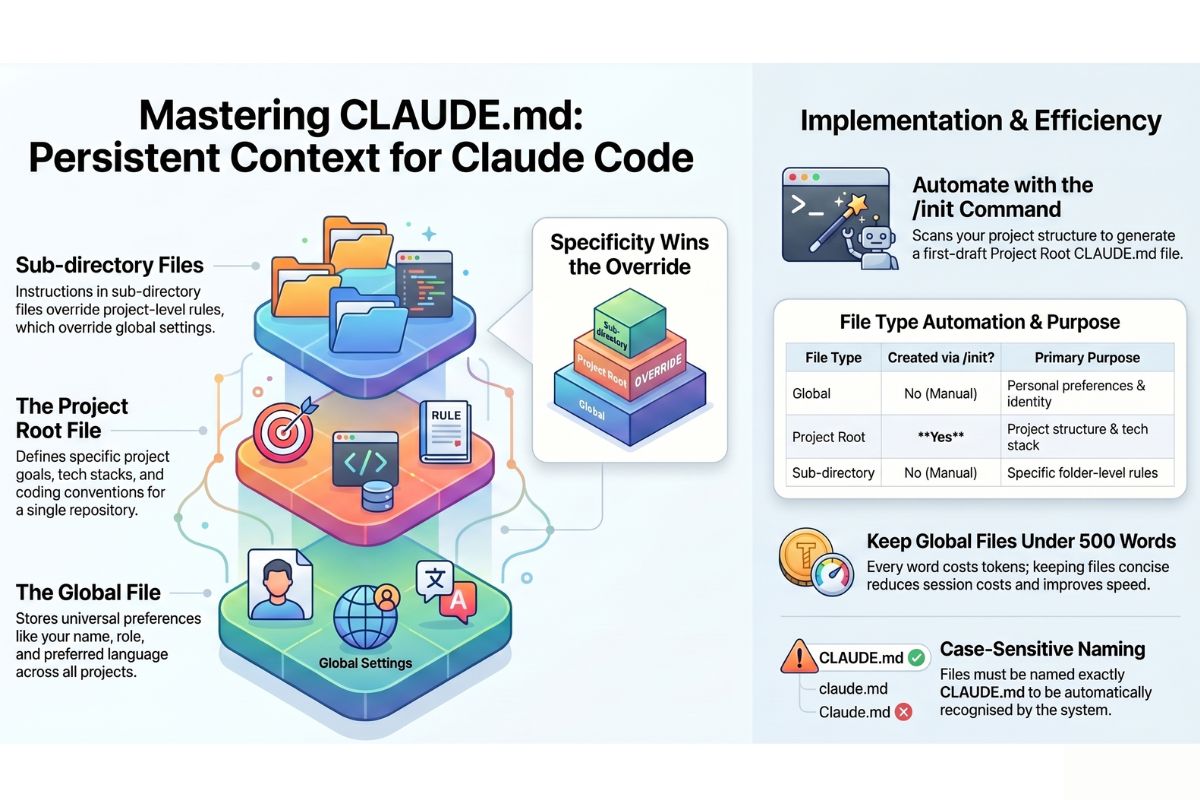
The Global file affects every Claude session on your computer, regardless of which project you are working on. This is where you put information about yourself that is always true — your name, your role, your preferred language or currency, your communication style.
Example content: “My name is Jason. I work in Durban, South Africa. Always use ZAR for currency, not USD. Write in South African English.”
2. The Project Root file
sits inside a specific project folder and only applies when you are working in that project. This is where you describe what the project is, how it is structured, and any rules specific to it.
3. The Sub-directory file
The Sub-directory file sits inside a specific folder within a project. Only applies when Claude is working in that folder. Useful when different parts of a project have different rules.
4. Imported files
Imported files instead of putting everything in one long CLAUDE.md, you can split instructions across multiple files and tell Claude to load them using @path/to/file.md.
How Claude reads these files
When you start a session, Claude automatically loads your global CLAUDE.md, the project root CLAUDE.md, any sub-directory CLAUDE.md files in folders it is working in, and any imported files. They all stack on top of each other – in other words, the lower level CLAUDE.md files overide the higher level ones (ie. sub-directory CLAUDE.md > project root CLAUDE.md > global CLAUDE.md.) More specific lower-level locations always overrides more general.
One nuance worth adding to the lesson: it is not always a full override. If the sub-directory file says “use casual language” and the global file says “always use ZAR for currency”, both rules apply — the sub-directory file only overrides on the specific points it addresses. A true conflict (where both files give opposite instructions on the same point) is where the more specific file wins.
Creating your Global CLAUDE.md
On Mac or Linux, open your terminal and run:
mkdir -p ~/.claudeThen create a file called CLAUDE.md inside that folder. Here is an example of a useful global CLAUDE.md:
# About me
My name is Jason. I am based in Durban, South Africa.
I run a training company called Jason Consulting.

# Preferences
- Always use ZAR for currency, never USD
- Write in South African English (colour, organised, licence)
- Use dates in the format: 26 April 2026
- Be direct — skip lengthy preambles and get to the point

# What I do
I create online training courses and manage a WordPress website.
I am not a developer — explain technical things in plain language.
Alternatively, you can run the /init command in the terminal
Creating a Project CLAUDE.md
Navigate to your project folder and create a CLAUDE.md file there. Example for a WordPress training site:
# Project: Claude Code Training Course
This is a WordPress website hosting the Claude Code training course.
The course has 32 pages: 1 hub page, 3 module pages, and 28 lesson pages.

# Rules
- All lesson pages follow the format established in Lesson 1
- Use plain English — the audience is non-technical
- Never use jargon without explaining it immediately
The /init command
/init is a Claude Code slash command that automatically generates a project-level CLAUDE.md for you. Here is exactly what it does and how it fits the four file types:
What /init does
When you run /init inside a project folder, Claude Code scans the project — reads the folder structure, looks at existing files like README.md, package.json, configuration files, and any code — and then writes a CLAUDE.md at the project root based on what it finds.
Instead of you having to describe your project from scratch, Claude figures out the relevant context itself and writes the briefing note on your behalf. You then review it, edit it, and it becomes your project CLAUDE.md.
Which files /init creates and which it does not
| File Type | Created by /init? |
|---|---|
| Global (~/.claude/CLAUDE.md) | No — you write this manually |
| Project root CLAUDE.md | Yes — this is exactly what /init creates |
| Sub-directory CLAUDE.md | No — you write these manually |
| Imported files | No — you create and reference these manually |
/init only ever touches the project root. It has no awareness of the other three types.
What /init typically generates
For a code project it might write: the project name and purpose, the tech stack and frameworks detected, key folders and what they contain, and any conventions it noticed in the code. For a non-code project like a WordPress site, it would write whatever it can find — folder names, file types, README content.
The right way to use it
Think of /init as a first draft, not a finished document. After it runs:
- Read what it generated
- Remove anything irrelevant or wrong
- Add your own preferences and rules it could not have known — tone, currency, audience, what not to touch
- Save it
It saves you 10 minutes of writing. You still need to review it.
A word on length — keep it focused
Every word in your CLAUDE.md costs tokens. The global file is loaded in every session, so a 3,000-word global CLAUDE.md makes every single call more expensive. Keep your global CLAUDE.md under 500 words.
Practical Exercise
- Create the
~/.claude/folder on your computer - Create
~/.claude/CLAUDE.md— write at least five personal preferences - Navigate to a project folder and create a
CLAUDE.mdthere - Start a Claude session and ask: “What do you know about me and this project?”
- Test the override: put a rule in your project CLAUDE.md that contradicts your global file — confirm the project rule wins
Common problems and how to fix them
Claude does not seem to be reading my CLAUDE.md — Make sure the file is named exactly CLAUDE.md — all capitals, .md extension. A common mistake is saving it as claude.md or CLAUDE.txt.
My instructions are being ignored — Check for contradictions between your global and project files. Also check that your instructions are clear and specific.
The file is getting very long — Split it using the @import feature.
What you have learned in this lesson
- CLAUDE.md files are briefing notes that Claude reads automatically at the start of every session
- There are four types: global, project root, sub-directory, and imported
- More specific files override more general ones
- Keep your global CLAUDE.md under 500 words to control costs