Table of Contents
What this lesson is about
Every result you get from Claude is only as good as the instruction you gave it — and most people, without realising it, give instructions that are far vaguer than they need to be. This lesson explains how Claude actually processes what you write, why precision matters so much, and exactly how to structure your instructions to get the results you want the first time.
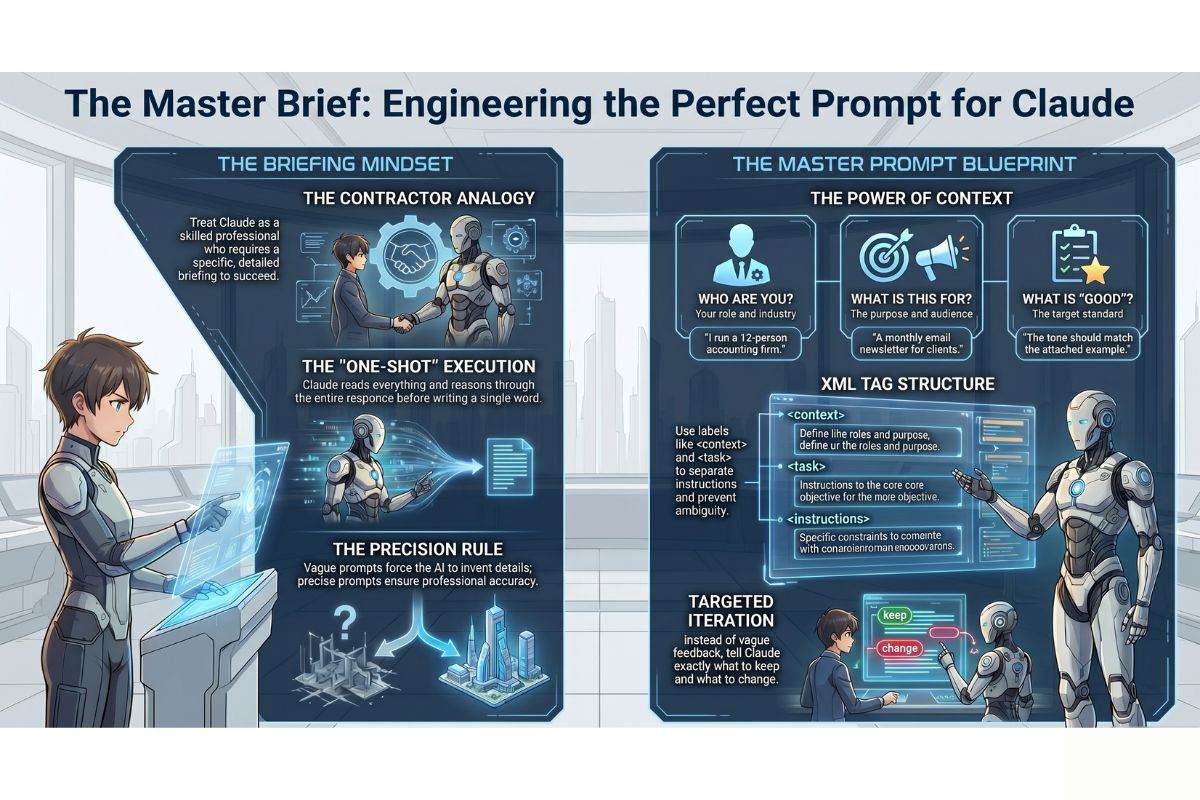
Core concept: The contractor briefing
Imagine you need building work done on your office. You hire an experienced contractor — someone who is genuinely skilled, has completed hundreds of similar jobs, and wants to do good work for you. You have one meeting before they start.
If you say: “Can you sort out the front area?” — they will do something. It may even be reasonable. But it almost certainly will not be exactly what you had in mind, because they had to fill in every gap themselves: What does “sort out” mean? What style? Which materials? What budget? What counts as done?
If instead you say: “We need the reception area repainted in a neutral off-white, the carpet replaced with the same grey vinyl flooring we used in the boardroom, and the lighting upgraded to match the branding guidelines I’ll email you — the whole job needs to be finished before Monday’s client visit” — the contractor has everything they need. The quality of the briefing determines the quality of the result.
Claude works in exactly the same way. It reads everything you provide, reasons through it carefully, and then produces one response. It does not think as it types — it does not pause halfway through to check whether it is heading in the right direction. It commits to a direction based entirely on what you gave it before it started.
A vague briefing produces vague work. A precise briefing produces precise work.
How Claude actually processes a prompt
When you send Claude a message, here is what happens in order:
- Claude reads your entire message, including any files or context attached to it
- Claude considers everything it knows that is relevant — its training, the conversation history, your
CLAUDE.mdif one exists - Claude reasons through what a good response would look like
- Claude writes the response from beginning to end
There is no back-and-forth happening internally. Claude does not draft something, reconsider it, and revise it before you see it. It makes its best judgement based on the information available and produces an answer.
This is why what you include before Claude starts matters so much more than what you say after you see the result. Corrections after the fact cost time and tokens. A well-constructed prompt upfront produces the right answer immediately.
Why vague prompts produce vague results
Here is the same request written two ways. Read both carefully and notice the difference in what each one gives Claude to work with.
POOR PROMPT:
Write something about our new service for the website.

IMPROVED PROMPT:
Write a 150-word introduction paragraph for the "Services" page of our website.
The service is a same-day document delivery service for law firms in Durban.
Our clients are practice managers and senior partners — professional, time-pressed people
who value reliability above everything else.
The tone should be confident and direct, not salesy or full of exclamation marks.
End with a single sentence that tells the reader how to get in touch.
Do not use the phrase "seamless experience."
The poor prompt leaves Claude to guess: What kind of content? What length? Who is the audience? What tone? What should it include or avoid?
The improved prompt answers all of those questions before Claude has to ask them. It specifies the format (an introduction paragraph), the length (150 words), the context (a law firm delivery service in Durban), the audience (practice managers and senior partners), the tone (confident, direct, not salesy), the structure (ends with a contact sentence), and even one thing to avoid.
Claude cannot read your mind. Everything it cannot infer from your instructions, it will invent. The improved prompt leaves almost nothing to invention.
The power of context
The single biggest upgrade most people can make to their prompts is adding context. Context means answering three questions before Claude ever starts:
| Question | What it tells Claude | Example |
|---|---|---|
| Who are you? | Your role, industry, and situation | “I run a 12-person accounting firm in Cape Town” |
| What is this for? | The purpose and audience of the output | “This is for a monthly email newsletter to existing clients” |
| What does good look like? | The standard or outcome you are aiming for | “The tone should match the example at the bottom of this message” |
Without context, Claude makes assumptions. With context, Claude makes informed decisions. The difference in output quality is dramatic — often more significant than any other change you could make to your prompts.
Positive and negative examples
One of the most powerful techniques in prompt engineering (the practice of writing clear, effective instructions for AI tools) is giving Claude both a positive example and a negative example — showing it what you want and what you explicitly do not want.
Here is how this looks in practice:
Write three subject lines for an email announcing our office closure over the
December holidays.

WRITE SUBJECT LINES LIKE THIS:
"Office closed 16–26 December — here's how to reach us urgently"
(Direct, informative, tells the reader what they need to know immediately)

DO NOT WRITE SUBJECT LINES LIKE THESE:
"Season's Greetings from the team at XYZ!"
"Exciting news about our upcoming holiday schedule 🎉"
(These are vague, overly cheerful, and do not give the reader useful information
in the subject line itself)
The positive example shows Claude the style, structure, and level of specificity you want. The negative example is equally important — it tells Claude which direction not to go, which is often harder to convey with words alone. Together, they narrow the target so tightly that almost any competent response will land inside it.
Specifying the exact format you want
Claude will default to a format it judges appropriate for the task. That judgement is often reasonable, but it is rarely exactly what you had in mind. If format matters — and for professional documents it almost always does — specify it explicitly.
Elements of format you can control:
| Element | How to specify it | Example |
|---|---|---|
| Length | Word count, number of sentences, number of items | “No longer than 200 words” |
| Structure | Headings, paragraphs, lists, tables | “Use three short paragraphs with no headings” |
| Tone | Formal, conversational, technical, empathetic | “Formal but warm — not stiff or bureaucratic” |
| What to include | Required elements | “Must include a call to action in the final sentence” |
| What to exclude | Phrases, formats, approaches to avoid | “Do not use bullet points. Do not use the word ‘leverage.'” |
| Point of view | First person, third person, second person | “Write in first person as if I am speaking directly” |
Specifying format is not being fussy — it is being efficient. Every format element you leave unspecified is a decision Claude makes for you, and that decision may require a correction.
Using XML tags for complex instructions
As your prompts grow more sophisticated, they can become difficult to read — both for you and for Claude. XML tags (structured labels that wrap different sections of text, written inside angle brackets like <this>) are a clean way to separate different parts of a complex instruction so each part is unambiguous.
You do not need to know anything about XML or programming to use them. They are simply labels. Claude understands them naturally and uses them to identify where one type of instruction ends and another begins.
Here is a real example of a complex prompt structured with XML tags:
<context>
I am the operations manager at a mid-sized logistics company in Johannesburg.
We are preparing for a new client onboarding process that we have never done before.
Our team of six includes two very experienced staff and four who joined this year.
</context>

<task>
Write a one-page checklist for our team to use when onboarding a new client for
the first time. The checklist should cover the first two weeks of the relationship.
Each item on the checklist should be actionable — a thing someone does,
not a category or a heading.
</task>

<format>
Numbered list, no more than 20 items.
Plain language — this will be printed and used in the field, not read on a screen.
No subheadings. No introduction paragraph. Just the numbered list.
</format>
Compare this to pasting the same information as one long paragraph. The tags make it immediately clear to Claude — and to you when you re-read it — which part is background information, which part is the actual task, and which part controls the output format. There is no ambiguity about where one section ends and another begins.
You can name your tags anything that makes sense to you: <background>, <audience>, <constraints>, <example>. The names do not need to follow any official standard — they simply need to be consistent and meaningful.
How to iterate effectively
Claude’s first response to any prompt should be treated as a draft, not a final answer. This is not a limitation — it is how professional work is done. Even a perfectly written brief rarely produces a finished document on the first pass.
The difference between ineffective and effective iteration is in how you follow up.
Ineffective follow-ups
That's not right. Try again.

Make it better.

I don't like this. Can you do it differently?
These responses give Claude no useful information. Claude cannot improve without knowing what specifically fell short.
Effective follow-ups
This is close. Three specific changes:
1. The opening sentence is too formal — make it sound more like a person talking,
   less like a corporate document.
2. Remove the third bullet point entirely — that point is not relevant to our clients.
3. The closing paragraph is too long. Cut it to two sentences maximum.
Keep everything else the same.

---

Good structure. The tone is right. Now rewrite it so it speaks directly to a
reader who has never heard of our company before — assume zero prior knowledge.

---

I prefer the second version over the first. Use the second version as the base
and add the specific pricing example from my first message.
Effective follow-ups tell Claude exactly what to keep, exactly what to change, and exactly what the change should achieve. Treat each exchange as a collaborative editing session with a capable colleague who responds only to specific, clear direction.
The one habit that improves every prompt
If you take one practice from this lesson and apply it from today, let it be this:
Write every prompt as if you are briefing a smart, capable person who knows nothing about your situation.
This person is intelligent and willing to help. They are not lazy or incompetent. But they have never heard of your business, your clients, your industry’s conventions, your past decisions, or the context that feels obvious to you. They cannot see your screen. They do not know who will read the output or how it will be used.
Before you send any prompt, read it back and ask: If someone walked in off the street and read only this, would they have everything they need to produce exactly what I want?
If the answer is no — add what is missing. The extra thirty seconds of writing will save you multiple rounds of revision.
Common prompt mistakes and how to fix them
Starting with the task before providing the context
The mistake: Jumping straight to “Write a letter to my supplier” before Claude knows who you are, what the relationship is, or what outcome you need.
The fix: Lead with context, then give the task. Answer who, what, and why before you get to the instruction itself. The XML tag structure (<context> then <task>) is a reliable way to build this habit.
Asking for multiple unrelated things in one prompt
The mistake: “Can you write the email, also summarise this document, and remind me what we discussed about the refund policy?”
The fix: One task per prompt. Claude will attempt all three, but the result will be shallower than if each task had the full prompt to itself. Finish one, then start the next.
Using vague quality words without defining them
The mistake: “Make it more professional.” “Make it friendlier.” “Make it shorter.”
The fix: Define what you mean. “More professional” to one person means formal language; to another it means removing contractions; to another it means restructuring the argument. Tell Claude specifically what professional looks like in your context: “Replace all contractions with full words and remove the anecdote in the second paragraph.”
Treating Claude’s confident tone as a guarantee of accuracy
The mistake: Assuming that because Claude wrote something clearly and confidently, it must be correct — especially for facts, figures, statistics, or legal and financial details.
The fix: Always verify factual claims independently, particularly numbers, dates, names, and any information that will be published or shared externally. Claude is excellent at structure, tone, reasoning, and synthesis — it is not a substitute for a primary source.
Giving up after one unsatisfactory response
The mistake: Getting a result that is not quite right and concluding that Claude cannot do this task.
The fix: One poor result almost always means the prompt needed more information, not that the task is impossible. Read Claude’s response and identify specifically what fell short — then add that missing information to your follow-up. Most tasks that “Claude can’t do” are tasks that Claude was not properly briefed to do.
Practical Exercise
a. Open your claude-practice folder, start a Claude Code session, and send the following poor prompt exactly as written:
Write something about our services.
Note the response. It will be generic and vague — Claude had almost nothing to work with. Now close the session and open a new one.
b. This time, write an improved version of the same prompt using the XML tag structure. Fill in the details with your own real business or a hypothetical one you make up for the exercise:
<context>
[Describe your business, your location, and who your customers are in 2–3 sentences.]
</context>

<task>
Write a 100–120 word paragraph describing one of your services.
The paragraph will appear on your website's Services page.
</task>

<format>
One paragraph, no headings, no bullet points.
Tone: professional and direct, as if written by the business owner.
End with a sentence that invites the reader to make contact.
Do not use the words "seamless," "solutions," or "passionate."
</format>
Compare the two responses side by side. The difference in quality and usefulness will be immediate and obvious.
c. Take Claude’s response from step (b) and practise iterating on it. Send one specific, targeted follow-up — for example: “The opening sentence is too generic. Rewrite only the first sentence so it immediately names who this service is for and what problem it solves. Keep the rest exactly as it is.” Notice how a precise follow-up produces a precise improvement. Run /cost when you are done — observe how the total cost of both a well-structured prompt and a targeted follow-up compares to the vague approach in step (a).
Common problems and how to fix them
Claude keeps producing a format I did not ask for (bullet points when I wanted paragraphs, or vice versa)
What is happening: Format instructions were either absent or not specific enough. Claude defaulted to what it judged most appropriate for the task type.
How to fix it: Add an explicit format instruction at the end of your prompt: “Write in continuous prose paragraphs. Do not use bullet points, numbered lists, or headings of any kind.” If Claude still reverts, start your follow-up with the format instruction rather than the content feedback: “First, the format: prose paragraphs only, no lists. Now, the content change I need is…”
My prompt is very long but Claude still misses things
What is happening: Long unstructured prompts can cause important instructions to get lost in the middle. Claude gives more weight to instructions at the beginning and end of a message, and details buried in long paragraphs can be underweighted.
How to fix it: Use XML tags to separate your prompt into labelled sections. Put your most critical instruction — especially format constraints and things to avoid — either at the very start or the very end of the message, not buried in the middle.
Claude adds a lot of caveats and disclaimers I did not ask for
What is happening: Claude defaults to adding qualifications when it is uncertain about what you need, or when the topic is one where it would normally signal caution.
How to fix it: Tell Claude explicitly in your prompt: “Do not add disclaimers, caveats, or suggestions to consult a professional. Just complete the task as described.” If disclaimers are a persistent issue in your work, add this instruction to your CLAUDE.md file so it applies to every session automatically.
Claude produces something completely different each time I send the same prompt
What is happening: Claude has a degree of variability built into it — it does not produce identical output from identical input every time. This is useful for creative tasks and a nuisance for consistent ones.
How to fix it: The more specific your prompt, the less variability you will see. Lock down the format, the structure, the length, and the tone, and the outputs will converge. If you need truly consistent output — for templates or standardised documents — include an example of the exact output format you want and ask Claude to follow it precisely.
What you have learned in this lesson
- Claude reads your entire prompt, reasons through it, and writes one response — it does not self-correct as it goes, which is why the quality of the input determines the quality of the output
- Vague prompts produce vague results because Claude has to invent anything you did not specify — and its inventions may not match your intentions
- Adding context (who you are, what this is for, what good looks like) is the single highest-leverage improvement you can make to any prompt
- Positive and negative examples together narrow Claude’s target more effectively than description alone
- Specifying format — length, structure, tone, what to include, what to avoid — removes guesswork and prevents unnecessary revision cycles
- XML tags (
<context>,<task>,<format>) make complex prompts easy to read and ensure no part of your instruction is missed or misread - Iteration is normal and expected — the skill is in following up with specific, targeted feedback rather than vague dissatisfaction
- The master habit: write every prompt as if briefing a smart person who knows nothing about your situation, and include everything they would need to produce exactly what you want