Table of Contents
What this lesson is about
This lesson introduces the Claude Agent SDK — the toolkit that lets you build your own custom AI-powered tools from scratch. You will learn what an SDK is, how agents are structured, and why this matters even if you never plan to write a single line of code yourself. By the end, you will understand how to think like an architect so that Claude can build exactly what you need.
The LEGO set — understanding what an SDK is
Imagine you want to build a model of your office. You could carve every brick from raw wood — or you could open a LEGO set. The LEGO set does not build anything for you. It gives you a collection of standardised, well-designed pieces that fit together reliably. You decide what to build. You arrange the pieces. The set just makes sure you are not starting from nothing.
An SDK — Software Development Kit — is the digital equivalent of that LEGO set. It is a collection of pre-written code, tools, and instructions that a company publishes so that developers (and increasingly, non-developers working with AI) can build on top of their platform without reinventing everything from scratch.
The Claude Agent SDK is Anthropic’s LEGO set for building AI-powered tools. It gives you the standard building blocks — the ability to give Claude a set of instructions, connect it to tools, and have it work through a task automatically — so that you can focus on what you want to build, not how the underlying machinery works.
What you can build with the Agent SDK
Custom tools that do not exist yet
The ready-made tools you have used so far — claude.ai, the Claude Code terminal, Cowork — cover a wide range of tasks. But every business has workflows that are specific to it. A food delivery brand needs different automation from a law firm, which needs different automation from a preschool.
The Agent SDK is where you build the tool that matches your specific situation. Not a general-purpose assistant, but a focused, opinionated tool that knows your systems, your terminology, and your processes.
Examples of what teams have built with agent SDKs like this one:
| What it does | Why it is useful |
|---|---|
| Reads incoming supplier invoices and flags discrepancies | Saves hours of manual checking each week |
| Monitors a shared inbox and drafts replies by category | Reduces response time without adding headcount |
| Pulls data from multiple reports and writes a weekly summary | Eliminates copy-paste work |
| Checks a calendar and prepares a briefing for each meeting | Ensures no one walks into a meeting unprepared |
You are building at the same level as Claude Code and Cowork
Here is something worth pausing on: Claude Code — the terminal tool you have been using throughout this course — is itself built on the Agent SDK. So is Cowork. When you learn to use the Agent SDK, you are not learning a beginner’s shortcut. You are working at the same level of the stack as the products Anthropic ships.
This matters because it means there is no ceiling above you. If Claude Code can do it, you can build something that does it too — tailored entirely to your needs.
How an agent actually works
The three parts of every agent
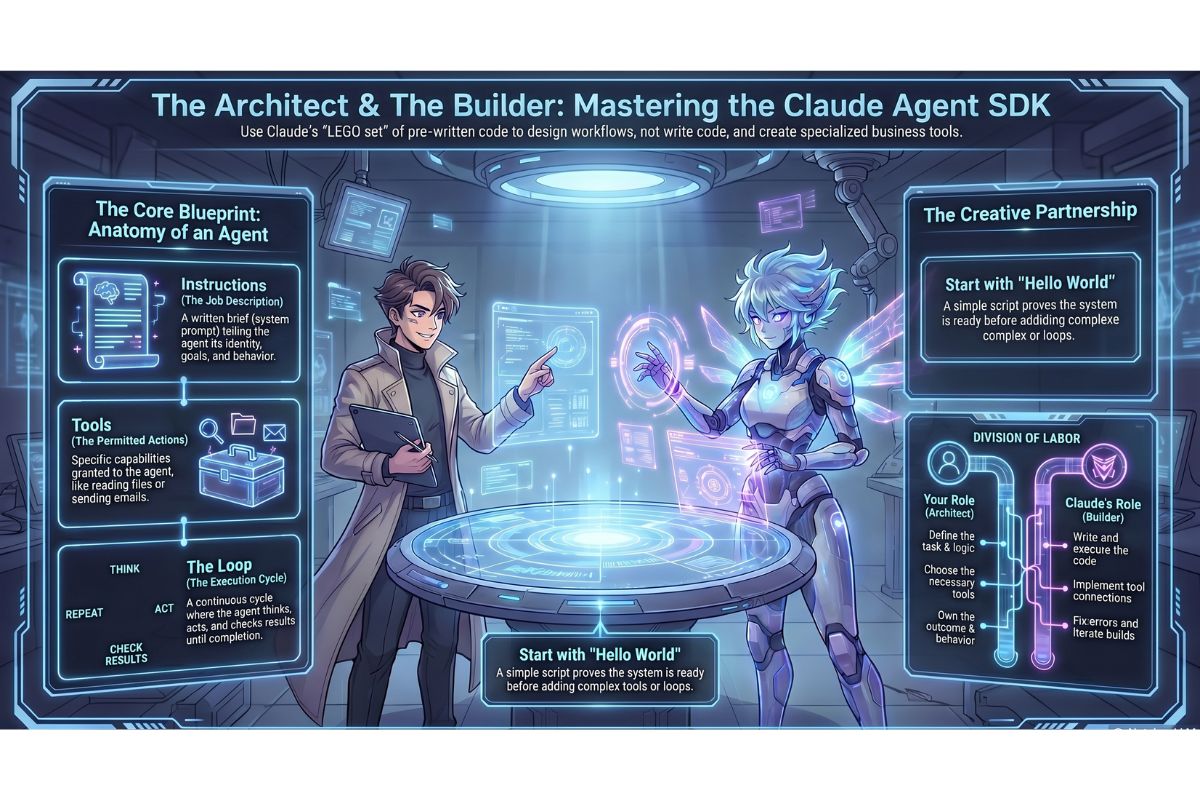
An agent built with the SDK has three core components. You do not need to understand the code — but you do need to understand the concepts, because you are the one who defines them.
1. Instructions
This is a written brief — sometimes called a system prompt — that tells the agent who it is, what it is trying to accomplish, and how it should behave. It is the equivalent of a job description. The clearer and more specific your instructions, the more useful the agent will be.
2. Tools
Tools are the actions the agent is allowed to take. Reading a file, sending an email, searching a calendar, writing to a spreadsheet — each of these is a tool. The agent can only do what you give it permission to do. This is deliberate: it keeps the agent focused and prevents it from doing things you did not intend.
3. The loop
Once the agent receives a task, it enters a loop — a cycle where it thinks, acts, checks the result, and decides what to do next. It keeps going until the task is complete or it hits a condition you have defined (such as a maximum number of steps, or a situation where it needs to ask you a question before continuing).
Think of it like a capable member of staff working through an inbox: read the first item, decide what to do, do it, mark it done, move to the next. Repeat until the inbox is empty.
Agent loop (simplified):

1. Receive task
2. Think: what is the next step?
3. Use a tool to take that step
4. Observe the result
5. Is the task complete? → If yes, stop and report. If no, go to step 2.
Real-world examples
Example 1: The folder monitor — summarise and email
What it does in plain English:
This agent watches a specific folder on your computer or cloud drive. Whenever a new file appears — a report, a document, a spreadsheet — it reads the file, generates a plain-English summary, and emails that summary to a list of recipients. No manual reading, no copy-pasting, no delays.
Who this is useful for: Any team that receives regular document drops — financial reports, supplier updates, compliance filings, research briefs.
Here is what the instruction prompt for this agent might look like:
You are a document monitoring assistant for a commercial management team.

Your job:
- When a new file appears in the monitored folder, read its contents.
- Write a clear, plain-English summary of no more than 150 words.
- Identify the document type (report, invoice, proposal, correspondence, other).
- Flag any items that require a decision or response within 48 hours.
- Email the summary to the distribution list using the send_email tool.
- Use the subject line format: [Document Type] — [Filename] — [Date]

Tone: Professional. No jargon. Write for a busy senior manager who has 30 seconds.
The tools this agent would need: read_file, send_email, get_current_date.
That instruction prompt is something you could write right now. Claude — or a developer working with Claude — handles the rest.
Example 2: The calendar briefing agent
What it does in plain English:
This agent checks your calendar each morning and, for every meeting scheduled that day, prepares a short briefing document. The briefing includes who is attending, what the stated purpose of the meeting is, any relevant background from your files, and a suggested agenda. It delivers everything to your inbox before you start your day.
Who this is useful for: Executives, managers, business development professionals — anyone who moves between multiple meetings and wants to show up prepared without spending time on preparation manually.
Here is what the instruction prompt for this agent might look like:
You are a meeting preparation assistant.

Each morning at 07:00, do the following for each meeting in today's calendar:

1. Retrieve the meeting details: title, attendees, time, and any notes.
2. Search the documents folder for anything related to the attendees or meeting topic.
3. Write a briefing of no more than 200 words covering:
   - Purpose of the meeting
   - Who is attending and their roles (if known)
   - Relevant background or history
   - Suggested talking points or questions
4. Compile all briefings into a single document and email it to me with the
   subject line: "Meeting Briefings — [Today's Date]"

If a meeting has no clear purpose or context, note this and suggest I clarify
before attending.
The tools this agent would need: read_calendar, search_documents, send_email, get_current_date.
Why this matters if you are not a developer
You are the architect — Claude is the builder
Here is the most important thing to understand about the Agent SDK: the hardest part of building an agent is not the code. The hardest part is knowing what you want it to do.
Defining the instructions, deciding which tools the agent needs, knowing when it should stop and ask for input versus when it should proceed on its own — these are judgement calls that require business knowledge, not programming knowledge. They require you.
Once you have defined those things clearly, you give that definition to Claude and ask it to build the agent. Claude writes the code. You review the behaviour. You refine the instructions. You are working at the level of product design, not software engineering.
| Your role | Claude’s role |
|---|---|
| Define what the agent does | Write the code that makes it happen |
| Write the instruction prompt | Implement the tool connections |
| Decide which tools it needs | Handle the technical plumbing |
| Test and refine the behaviour | Fix errors and iterate |
| Own the outcome | Execute the build |
This is not a workaround. This is exactly how good software gets built — a person who understands the problem works with a person (or tool) that understands the implementation.
Getting started — your first agent
The hello-world example
In programming, a “hello world” example is the simplest possible working version of something — enough to prove the system is set up correctly and something is actually running. For the Agent SDK, the hello-world agent does one thing: it receives a task, uses one tool, and returns a result.
Before you run anything, you will need:
- Python installed on your computer (Claude can walk you through this)
- The Anthropic SDK installed — one terminal command handles this
- Your API key configured — you covered this in Lesson 19
Here is the first step: installing the SDK. Open your terminal and run this command.
pip install anthropic
pip is Python’s package manager — a tool that downloads and installs Python libraries from the internet. Running this command downloads the Anthropic SDK (the LEGO set) onto your computer so your scripts can use it.
Once that is done, here is the simplest possible agent — one that receives an instruction and responds:
import anthropic

# Create a connection to the API
client = anthropic.Anthropic()

# Define the agent's instructions and send it a task
response = client.messages.create(
    model="claude-opus-4-5",
    max_tokens=1024,
    system="You are a meeting preparation assistant. Summarise tasks clearly and briefly.",
    messages=[
        {"role": "user", "content": "Prepare a one-sentence briefing for a budget review meeting."}
    ]
)

# Print the agent's response
print(response.content[0].text)
This is the foundation. Real agents add tools, loops, and triggers on top of this structure — but this is the core. Everything else is an extension of what you see here.
When you are ready to go further, ask Claude: “Take this basic script and add a tool that reads a text file from my computer and includes its contents in the briefing.” Claude will extend it for you, step by step.
Practical Exercise
a. Think of one repetitive task in your business that involves reading something, making a judgement, and producing an output — a summary, an email, a flag, a report. Write a plain-English description of that task in 3–5 sentences. This is the foundation of your first agent brief.
b. Using the format of the two examples in this lesson, write an instruction prompt for your agent. Include: what it does, how it should behave, what it should produce, and what format the output should take. You do not need to write any code — just the instructions.
c. Open a Claude conversation and paste your instruction prompt with this request:
“I want to build a Claude agent using the Anthropic Agent SDK that follows these instructions. What tools would it need, and can you write the Python script to get it started? Assume I am non-technical — please comment every line.”
Review what Claude produces. Ask follow-up questions until you understand what each part does. You are not expected to run it today — the goal is to see how quickly a working starting point materialises from a clear brief.
Common problems and how to fix them
The agent runs but does not do anything useful
This is almost always an instructions problem, not a code problem. Vague instructions produce vague behaviour. Go back to your system prompt and make it more specific: add the exact output format you want, the tone, the length, and any conditions the agent should watch for. Ask Claude: “Here are my agent instructions and here is what it produced — how do I rewrite the instructions to get this result instead?”
The agent tries to use a tool that is not connected
The agent can only use tools that have been explicitly given to it. If your instructions mention sending an email but no email tool is configured, the agent will either fail or pretend to send something it cannot. When this happens, ask Claude: “My agent needs to send emails — show me how to add an email tool to this script.”
The loop does not stop
An agent loop that has no clear stopping condition can run indefinitely, using up tokens and potentially doing things you did not intend. Always define a stopping condition in your instructions — either a maximum number of steps, a signal phrase the agent should watch for, or an explicit end state. If your agent is looping unexpectedly, ask Claude: “Add a maximum step limit of 10 to this agent and have it report what it has done so far if it reaches the limit.”
pip install anthropic fails with a permissions error
This means your computer is preventing the installation from writing to a protected folder. Run the command with a user flag instead:
pip install anthropic --user
If that also fails, ask Claude: “I am getting a permissions error when running pip install on [your operating system]. How do I fix this?”
The API key is not found when the script runs
The script needs your API key to authenticate with Anthropic’s servers. If it cannot find the key, it will throw an authentication error. The fix is to store the key as an environment variable — a setting on your computer that scripts can read automatically. Ask Claude: “How do I set my Anthropic API key as an environment variable on [your operating system]?”
What you have learned in this lesson
- An SDK is a standardised toolkit — like a LEGO set — that gives you the building blocks to create something specific without starting from scratch
- The Claude Agent SDK lets you build custom AI-powered tools tailored to your exact business workflows
- Claude Code and Cowork are both built on the Agent SDK — learning this puts you at the same level as those products
- Every agent has three parts: instructions (what it does), tools (what it can act on), and a loop (how it keeps working until the task is done)
- A folder-monitoring agent and a calendar briefing agent are practical examples of what non-technical business owners can build
- Your role is to define the instructions and the desired outcome — Claude’s role is to write the code that makes it happen
- The first step to getting started is installing the SDK with
pip install anthropic, followed by a simple script that proves the connection works - The most common agent problems are vague instructions, missing tools, and loops without stopping conditions — all of which Claude can help you fix